
SpringBoot 启动时自动执行代码的几种方式讲解
2人参与 • 2025-12-09 • Java
前言
目前开发的springboot项目在启动的时候需要预加载一些资源。而如何实现启动过程中执行代码,或启动成功后执行,是有很多种方式可以选择,我们可以在static代码块中实现,也可以在构造方法里实现,也可以使用@postconstruct注解实现。
当然也可以去实现spring的applicationrunner与commandlinerunner接口去实现启动后运行的功能。在这里整理一下,在这些位置执行的区别以及加载顺序。
java自身的启动时加载方式
static代码块
static静态代码块,在类加载的时候即自动执行。
构造方法
在对象初始化时执行。执行顺序在static静态代码块之后。
spring启动时加载方式
@postconstruct注解
postconstruct注解使用在方法上,这个方法在对象依赖注入初始化之后执行。
applicationrunner和commandlinerunner
springboot提供了两个接口来实现spring容器启动完成后执行的功能,两个接口分别为
commandlinerunner和applicationrunner。这两个接口需要实现一个run方法,将代码在run中实现即可。这两个接口功能基本一致,其区别在于run方法的入参。
applicationrunner的run方法入参为applicationarguments,为commandlinerunner的run方法入参为string数组。何为applicationarguments?
官方文档解释为:
provides access to the arguments that were used to run a springapplication.
在spring应用运行时使用的访问应用参数。即我们可以获取到
springapplication.run(…)的应用参数。order注解
当有多个类实现了
commandlinerunner和applicationrunner接口时,可以通过在类上添加@order注解来设定运行顺序。
代码测试
为了测试启动时运行的效果和顺序,编写几个测试代码来运行看看。
testpostconstruct
@component
public class testpostconstruct {

    static {
        system.out.println("static");
    }
    public testpostconstruct() {
        system.out.println("constructer");
    }

    @postconstruct
    public void init() {
        system.out.println("postconstruct");
    }
}
testapplicationrunner
@component
@order(1)
public class testapplicationrunner implements applicationrunner{
    @override
    public void run(applicationarguments applicationarguments) throws exception {
        system.out.println("order1:testapplicationrunner");
    }
}
testcommandlinerunner
@component
@order(2)
public class testcommandlinerunner implements commandlinerunner {
    @override
    public void run(string... strings) throws exception {
        system.out.println("order2:testcommandlinerunner");
    }
}
执行结果
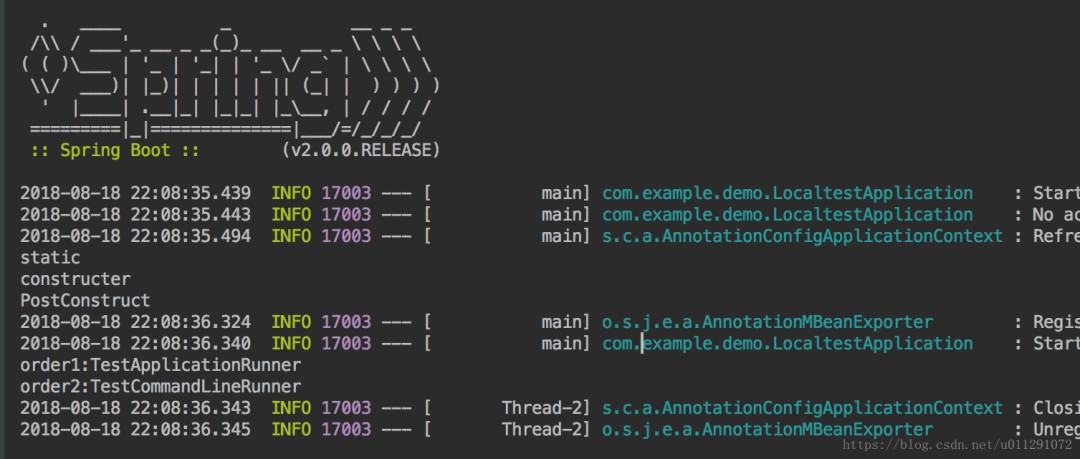
总结
spring应用启动过程中,肯定是要自动扫描有@component注解的类,加载类并初始化对象进行自动注入。加载类时首先要执行static静态代码块中的代码,之后再初始化对象时会执行构造方法。
在对象注入完成后,调用带有@postconstruct注解的方法。当容器启动成功后,再根据@order注解的顺序调用commandlinerunner和applicationrunner接口类中的run方法。
因此,加载顺序为static>constructer>@postconstruct>commandlinerunner和applicationrunner.
到此这篇关于springboot 启动时自动执行代码的几种方式讲解的文章就介绍到这了,更多相关springboot 启动时自动执行代码内容请搜索代码网以前的文章或继续浏览下面的相关文章希望大家以后多多支持代码网!
赞 (0)
您想发表意见!!点此发布评论






发表评论