
通过Nginx(basic auth)实现Prometheus账号密码登录
8人参与 • 2026-01-31 • Linux
一、原因
因客户red hat 7.5服务器安装部署grafana无法添加prometheus数据源,以及无法修改初始密码,为确保环境访问安全,特别研究通过账号密码认证访问prometheus,搜索了很多资料,但都缺这缺那,所以我这里记录下具体实现过程:
二、安装部署httpd
方法一:使用yum安装
yum -y install apr apr-util httpd
方法二:使用源码安装
yum -y install expat-devel gcc gcc-c++ autoreconf libtoolize automake
1、下载httpd安装包
wget http://mirrors.hust.edu.cn/apache/httpd/httpd-2.4.46.tar.gz
2、解压
tar zxvf httpd-2.4.46.tar.gz
3、下载新的apr、apr-util安装(安装过程会有各种奇葩错误,自行搜索资料解决,这里不具体讲解)
wget http://mirror.bit.edu.cn/apache/apr/apr-1.7.0.tar.gz
wget http://mirror.bit.edu.cn/apache/apr/apr-util-1.6.1.tar.gz
4、安装apr、apr-util
tar -zxvf apr-1.7.0.tar.gz
tar -zxvf apr-util-1.6.1.tar.gz
cd /opt/apr-1.7.0
./configure --prefix=/usr/local/apr && make && make install

cd /opt/apr-util-1.6.1
./configure --prefix=/usr/local/apr-util && make && make install
5、进入目录cd httpd-2.4.46/
cd /opt/httpd-2.4.46/
./configure --prefix=/usr/local/apache2/ --enable-rewrite --enable-so --with-apr=/usr/local/apr --with-apr-util=/usr/local/apr-util
make && make install
三、创建prometheus访问认证账号密码
备注:路径与用户名及密码根据实际环境操作变更(在交互界面输入两次相同的密码)
/usr/bin/htpasswd -c /etc/nginx/.htpasswd promethues
四、配置nginx访问配置
vim /etc/nginx/conf/nginx.conf
        location / {
            auth_basic           "prometheus";
            auth_basic_user_file /etc/nginx/.htpasswd;
            proxy_pass   http://localhost:9090;
            proxy_set_header   host    $host;
            proxy_set_header   x-real-ip   $remote_addr;
            proxy_set_header   x-forwarded-for $proxy_add_x_forwarded_for;
            root   html;
            index  index.html index.htm;
        }

/etc/nginx/sbin/nginx -t
/etc/nginx/sbin/nginx -s reload
五、修改prometheus.yml文件,配置basic auth认证
1、修改prometheus.yml文件
vim /usr/local/prometheus/prometheus.yml
  - job_name: 'prometheus'

    # metrics_path defaults to '/metrics'
    # scheme defaults to 'http'.

    static_configs:
    - targets: ['localhost:9090']
    basic_auth:
      username: promethues
      password: 密码
2、重启prometheus服务
systemctl restart prometheus
systemctl status prometheus
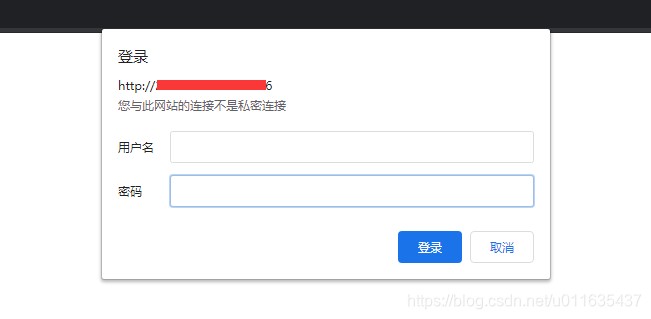
3、访问prometheus服务界面
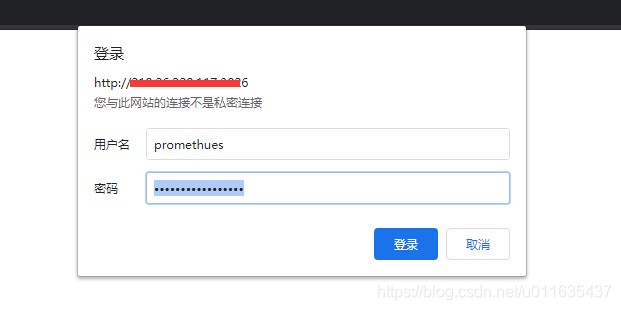
4、输入配置的用户名与认证密码
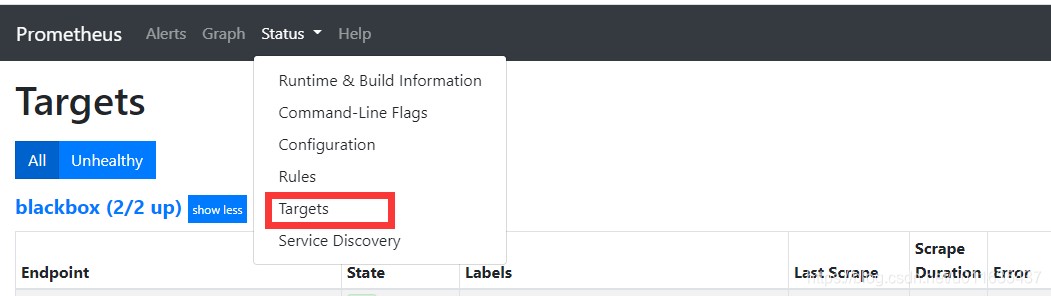
5、查看targets信息
到此这篇关于通过nginx(basic auth)实现prometheus账号密码登录的文章就介绍到这了,更多相关nginx 实现prometheus账号密码登录内容请搜索代码网以前的文章或继续浏览下面的相关文章希望大家以后多多支持代码网!
赞 (0)
您想发表意见!!点此发布评论




发表评论