
在Nginx上配置HTTPS证书的完整指南
230人参与 • 2026-04-23 • https
引言
在当今互联网环境中,https 已经成为网站标配。无论是个人博客、企业官网还是 api 服务,启用 https 不仅能提升用户信任度,还能增强数据安全性,甚至影响搜索引擎排名。nginx 作为高性能的 web 服务器和反向代理,是部署 https 的理想选择。本文将详细介绍如何在 nginx 中配置 https 证书,涵盖自签名证书、let’s encrypt 免费证书、商业证书等多种方案,并提供 java 应用集成示例。
为什么需要 https?
在深入配置之前,让我们先理解为什么 https 如此重要:
- 数据加密:防止中间人攻击,保护用户隐私
- 身份验证:确保用户访问的是真实的网站而非钓鱼网站
- 完整性保护:防止数据在传输过程中被篡改
- seo 优势:google 等搜索引擎优先收录 https 网站
- 现代浏览器要求:chrome 等浏览器对 http 网站标记为"不安全"
// java 示例:检测 http/https 请求
import javax.servlet.http.httpservletrequest;
public class securityutils {
    public static boolean issecurerequest(httpservletrequest request) {
        // 检查请求是否通过 https
        if ("https".equals(request.getscheme())) {
            return true;
        }
        // 检查 x-forwarded-proto 头(当使用反向代理时)
        string forwardedproto = request.getheader("x-forwarded-proto");
        return "https".equals(forwardedproto);
    }
    public static string getsecureurl(httpservletrequest request) {
        if (issecurerequest(request)) {
            return request.getrequesturl().tostring();
        } else {
            // 将 http url 转换为 https
            string url = request.getrequesturl().tostring();
            return url.replacefirst("http://", "https://");
        }
    }
}
准备工作
在配置 https 之前,确保你已准备好以下内容:
- 域名:拥有一个已备案的域名(国内服务器需要)
- 服务器:安装了 nginx 的 linux 服务器
- ssh 访问权限:能够通过 ssh 连接到服务器
- 防火墙配置:开放 443 端口
检查 nginx 是否已安装:
nginx -v
如果未安装,可以使用以下命令安装:
# ubuntu/debian
sudo apt update
sudo apt install nginx
# centos/rhel
sudo yum install epel-release
sudo yum install nginx
方案一:自签名证书(开发测试环境)
自签名证书适合开发和测试环境,但在生产环境中浏览器会显示安全警告。
生成自签名证书
# 创建证书目录
sudo mkdir -p /etc/nginx/ssl
# 生成私钥和自签名证书
sudo openssl req -x509 -nodes -days 365 -newkey rsa:2048 \
    -keyout /etc/nginx/ssl/selfsigned.key \
    -out /etc/nginx/ssl/selfsigned.crt \
    -subj "/c=cn/st=beijing/l=beijing/o=mycompany/cn=example.com"
配置 nginx 使用自签名证书
编辑 nginx 配置文件:
sudo nano /etc/nginx/sites-available/example.com
server {
    listen 443 ssl;
    server_name example.com www.example.com;
    # ssl 配置
    ssl_certificate /etc/nginx/ssl/selfsigned.crt;
    ssl_certificate_key /etc/nginx/ssl/selfsigned.key;
    # ssl 安全设置
    ssl_protocols tlsv1.2 tlsv1.3;
    ssl_ciphers ecdhe-rsa-aes256-gcm-sha512:dhe-rsa-aes256-gcm-sha512:ecdhe-rsa-aes256-gcm-sha384:dhe-rsa-aes256-gcm-sha384:ecdhe-rsa-aes256-sha384;
    ssl_prefer_server_ciphers on;
    ssl_session_cache shared:ssl:10m;
    ssl_session_timeout 10m;
    # 根目录和索引文件
    root /var/www/html;
    index index.html index.htm;
    location / {
        try_files $uri $uri/ =404;
    }
}
# http 到 https 重定向
server {
    listen 80;
    server_name example.com www.example.com;
    return 301 https://$server_name$request_uri;
}
启用配置并重启 nginx
# 创建符号链接
sudo ln -s /etc/nginx/sites-available/example.com /etc/nginx/sites-enabled/
# 测试配置
sudo nginx -t
# 重启 nginx
sudo systemctl restart nginx
// java 示例:spring boot 应用中强制 https
import org.springframework.context.annotation.configuration;
import org.springframework.security.config.annotation.web.builders.httpsecurity;
import org.springframework.security.config.annotation.web.configuration.websecurityconfigureradapter;
@configuration
public class securityconfig extends websecurityconfigureradapter {
    @override
    protected void configure(httpsecurity http) throws exception {
        http
            .requireschannel()
                .requestmatchers(r -> r.getheader("x-forwarded-proto") != null)
                .requiressecure()
            .and()
            .authorizerequests()
                .anyrequest().permitall();
    }
}
方案二:let’s encrypt 免费证书(生产环境推荐)
let’s encrypt 提供免费的 ssl/tls 证书,有效期 90 天,支持自动续期。
安装 certbot
# ubuntu/debian
sudo apt update
sudo apt install certbot python3-certbot-nginx
# centos/rhel 7
sudo yum install epel-release
sudo yum install certbot python3-certbot-nginx
# centos/rhel 8+
sudo dnf install certbot python3-certbot-nginx
获取证书
# 自动获取并配置证书
sudo certbot --nginx -d example.com -d www.example.com
# 或者仅获取证书(手动配置)
sudo certbot certonly --nginx -d example.com -d www.example.com
certbot 会自动修改你的 nginx 配置文件,添加 ssl 相关配置。
手动配置 let’s encrypt 证书
如果你选择手动配置,证书文件通常位于:
- 证书文件:
/etc/letsencrypt/live/example.com/fullchain.pem - 私钥文件:
/etc/letsencrypt/live/example.com/privkey.pem
server {
    listen 443 ssl http2;
    listen [::]:443 ssl http2;
    server_name example.com www.example.com;
    # let's encrypt 证书
    ssl_certificate /etc/letsencrypt/live/example.com/fullchain.pem;
    ssl_certificate_key /etc/letsencrypt/live/example.com/privkey.pem;
    # ssl 安全强化配置
    ssl_protocols tlsv1.2 tlsv1.3;
    ssl_ciphers ecdhe-ecdsa-aes128-gcm-sha256:ecdhe-rsa-aes128-gcm-sha256:ecdhe-ecdsa-aes256-gcm-sha384:ecdhe-rsa-aes256-gcm-sha384:ecdhe-ecdsa-chacha20-poly1305:ecdhe-rsa-chacha20-poly1305:dhe-rsa-aes128-gcm-sha256:dhe-rsa-aes256-gcm-sha384;
    ssl_prefer_server_ciphers off;
    # ocsp stapling
    ssl_stapling on;
    ssl_stapling_verify on;
    resolver 8.8.8.8 8.8.4.4 valid=300s;
    resolver_timeout 5s;
    # hsts (http strict transport security)
    add_header strict-transport-security "max-age=63072000; includesubdomains; preload" always;
    # 其他安全头
    add_header x-frame-options deny;
    add_header x-content-type-options nosniff;
    add_header x-xss-protection "1; mode=block";
    # 根目录
    root /var/www/html;
    index index.html index.htm;
    location / {
        try_files $uri $uri/ =404;
    }
}
# http 到 https 重定向
server {
    listen 80;
    listen [::]:80;
    server_name example.com www.example.com;
    return 301 https://$server_name$request_uri;
}
自动续期配置
let’s encrypt 证书每 90 天需要续期一次。certbot 可以自动处理:
# 测试续期(不会实际执行)
sudo certbot renew --dry-run
# 设置定时任务自动续期
sudo crontab -e
添加以下行(每天凌晨 2 点检查是否需要续期):
0 2 * * * /usr/bin/certbot renew --quiet --post-hook "systemctl reload nginx"
// java 示例:spring boot 应用中的 https 相关配置
import org.springframework.beans.factory.annotation.value;
import org.springframework.context.annotation.bean;
import org.springframework.context.annotation.configuration;
import org.springframework.boot.web.embedded.tomcat.tomcatservletwebserverfactory;
import org.springframework.boot.web.server.ssl;
import org.springframework.boot.web.server.webserverfactorycustomizer;
@configuration
public class httpsconfig {
    @value("${server.ssl.enabled:false}")
    private boolean sslenabled;
    @value("${server.ssl.key-store:}")
    private string keystore;
    @value("${server.ssl.key-store-password:}")
    private string keystorepassword;
    @bean
    public webserverfactorycustomizer<tomcatservletwebserverfactory> containercustomizer() {
        return factory -> {
            if (sslenabled && !keystore.isempty()) {
                ssl ssl = new ssl();
                ssl.setkeystore(keystore);
                ssl.setkeystorepassword(keystorepassword);
                ssl.setkeyalias("tomcat");
                factory.setssl(ssl);
            }
        };
    }
}
方案三:商业证书(企业级应用)
对于企业级应用,可能需要购买商业 ssl 证书,如 digicert、geotrust、symantec 等。
申请商业证书流程
- 生成 csr(certificate signing request)
# 生成私钥
openssl genrsa -out example.com.key 2048
# 生成 csr
openssl req -new -key example.com.key -out example.com.csr
- 提交 csr 到证书颁发机构
- 验证域名所有权
- 下载证书文件
配置商业证书
商业证书通常包含多个文件:
- 主证书:
example.com.crt - 中间证书:
intermediate.crt - 根证书:
root.crt
需要将它们合并成一个文件:
cat example.com.crt intermediate.crt root.crt > fullchain.crt
server {
    listen 443 ssl http2;
    server_name example.com www.example.com;
    # 商业证书配置
    ssl_certificate /etc/nginx/ssl/fullchain.crt;
    ssl_certificate_key /etc/nginx/ssl/example.com.key;
    # 高级 ssl 配置
    ssl_protocols tlsv1.2 tlsv1.3;
    ssl_ciphers 'ecdhe-ecdsa-aes256-gcm-sha384:ecdhe-rsa-aes256-gcm-sha384:ecdhe-ecdsa-chacha20-poly1305:ecdhe-rsa-chacha20-poly1305:ecdhe-ecdsa-aes128-gcm-sha256:ecdhe-rsa-aes128-gcm-sha256';
    ssl_prefer_server_ciphers off;
    ssl_ecdh_curve secp384r1;
    ssl_session_cache shared:ssl:10m;
    ssl_session_timeout 10m;
    ssl_session_tickets off;
    # ocsp stapling
    ssl_stapling on;
    ssl_stapling_verify on;
    ssl_trusted_certificate /etc/nginx/ssl/fullchain.crt;
    resolver 8.8.8.8 8.8.4.4 valid=300s;
    resolver_timeout 5s;
    # hsts
    add_header strict-transport-security "max-age=63072000; includesubdomains; preload" always;
    # 安全头
    add_header x-frame-options sameorigin;
    add_header x-content-type-options nosniff;
    add_header x-xss-protection "1; mode=block";
    add_header referrer-policy "strict-origin-when-cross-origin";
    add_header content-security-policy "default-src 'self'; script-src 'self' 'unsafe-inline' 'unsafe-eval'; style-src 'self' 'unsafe-inline'; img-src 'self' data:; font-src 'self'; connect-src 'self'; frame-src 'none';";
    # gzip 压缩
    gzip on;
    gzip_vary on;
    gzip_min_length 1024;
    gzip_types text/plain text/css application/json application/javascript text/xml application/xml application/xml+rss text/javascript;
    # 根目录
    root /var/www/html;
    index index.html index.htm;
    location / {
        try_files $uri $uri/ =404;
    }
    # 静态资源缓存
    location ~* \.(jpg|jpeg|png|gif|ico|css|js)$ {
        expires 1y;
        add_header cache-control "public, immutable";
    }
}
http 到 https 重定向的最佳实践
确保所有 http 请求都被重定向到 https:
# 方法一:简单的 301 重定向
server {
    listen 80;
    server_name example.com www.example.com;
    return 301 https://$server_name$request_uri;
}
# 方法二:保留原始请求路径和参数
server {
    listen 80;
    server_name example.com www.example.com;
    return 301 https://$host$request_uri;
}
# 方法三:针对特定路径的重定向
server {
    listen 80;
    server_name example.com www.example.com;
    location /admin {
        return 301 https://$server_name$request_uri;
    }
    location /api {
        return 301 https://$server_name$request_uri;
    }
    # 其他路径可以保持 http(不推荐)
    location / {
        # 继续使用 http
        root /var/www/html;
        index index.html;
    }
}
// java 示例:servlet filter 强制 https
import javax.servlet.*;
import javax.servlet.http.httpservletrequest;
import javax.servlet.http.httpservletresponse;
import java.io.ioexception;
public class httpsenforcementfilter implements filter {
@override
public void dofilter(servletrequest request, servletresponse response, filterchain chain)
throws ioexception, servletexception {
httpservletrequest httprequest = (httpservletrequest) request;
httpservletresponse httpresponse = (httpservletresponse) response;
// 检查是否为 https 请求
if (!"https".equals(httprequest.getscheme()) &&
!"https".equals(httprequest.getheader("x-forwarded-proto"))) {
// 构建 https url
stringbuilder httpsurl = new stringbuilder("https://");
httpsurl.append(httprequest.getservername());
// 添加端口(如果不是默认的 443)
int port = httprequest.getserverport();
if (port != 80 && port != 443) {
httpsurl.append(":").append(port);
}
httpsurl.append(httprequest.getrequesturi());
// 添加查询字符串
string querystring = httprequest.getquerystring();
if (querystring != null) {
httpsurl.append("?").append(querystring);
}
// 重定向到 https
httpresponse.setstatus(httpservletresponse.sc_moved_permanently);
httpresponse.setheader("location", httpsurl.tostring());
return;
}
chain.dofilter(request, response);
}
}ssl/tls 性能优化
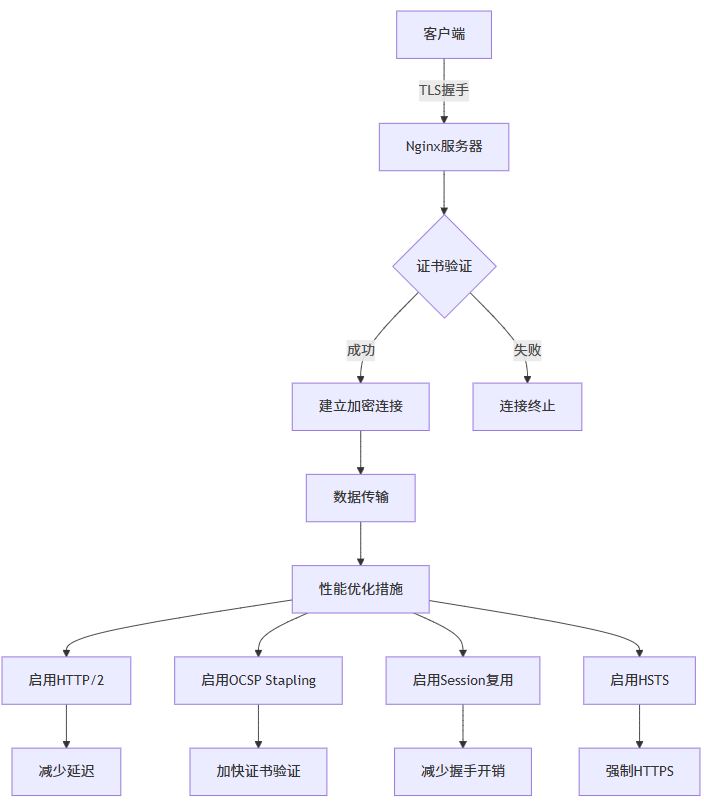
启用 http/2
http/2 可以显著提升 https 网站性能:
server {
    listen 443 ssl http2;
    listen [::]:443 ssl http2;
    # ... 其他配置
}
session 复用配置
# ssl session 缓存
ssl_session_cache shared:ssl:10m;
ssl_session_timeout 1h;
ssl_session_tickets on;
ssl_session_ticket_key /etc/nginx/ssl/ticket.key;
# 生成 ticket key
openssl rand 48 > /etc/nginx/ssl/ticket.key
ssl 缓冲区优化
# ssl 缓冲区大小
ssl_buffer_size 4k;

# ssl 预读
ssl_preread on;
安全加固配置
ssl 协议和加密套件
# 推荐的安全配置
ssl_protocols tlsv1.2 tlsv1.3;
ssl_ciphers 'tls_aes_128_gcm_sha256:tls_aes_256_gcm_sha384:tls_chacha20_poly1305_sha256:ecdhe-ecdsa-aes128-gcm-sha256:ecdhe-rsa-aes128-gcm-sha256:ecdhe-ecdsa-aes256-gcm-sha384:ecdhe-rsa-aes256-gcm-sha384:ecdhe-ecdsa-chacha20-poly1305:ecdhe-rsa-chacha20-poly1305';
ssl_prefer_server_ciphers off;
hsts (http strict transport security)
# 严格的 hsts 配置
add_header strict-transport-security "max-age=63072000; includesubdomains; preload" always;
csp (content security policy)
# 严格的内容安全策略
add_header content-security-policy "default-src 'self'; script-src 'self' 'unsafe-inline' 'unsafe-eval' https://cdn.example.com; style-src 'self' 'unsafe-inline' https://cdn.example.com; img-src 'self' data: https://*.example.com; font-src 'self' https://fonts.gstatic.com; connect-src 'self' https://api.example.com; frame-src 'none'; object-src 'none';" always;
// java 示例:spring security 中的 https 配置
import org.springframework.context.annotation.bean;
import org.springframework.context.annotation.configuration;
import org.springframework.security.config.annotation.web.builders.httpsecurity;
import org.springframework.security.config.annotation.web.configuration.enablewebsecurity;
import org.springframework.security.web.securityfilterchain;
@configuration
@enablewebsecurity
public class websecurityconfig {
    @bean
    public securityfilterchain filterchain(httpsecurity http) throws exception {
        http
            .requireschannel(channel ->
                channel.anyrequest().requiressecure()
            )
            .headers(headers ->
                headers
                    .httpstricttransportsecurity(hsts ->
                        hsts
                            .maxageinseconds(63072000)
                            .includesubdomains(true)
                            .preload(true)
                    )
                    .frameoptions(frame -> frame.deny())
                    .contenttypeoptions(contenttype -> contenttype.disable())
                    .xssprotection(xss -> xss.block(false))
            )
            .authorizehttprequests(authz ->
                authz.anyrequest().permitall()
            );
        return http.build();
    }
}
docker 环境下的 https 配置
在 docker 环境中配置 https 有其特殊性:
docker compose 配置
version: '3.8'
services:
  nginx:
    image: nginx:latest
    ports:
      - "80:80"
      - "443:443"
    volumes:
      - ./nginx.conf:/etc/nginx/nginx.conf
      - ./ssl:/etc/nginx/ssl
      - ./html:/usr/share/nginx/html
    restart: unless-stopped
  app:
    image: my-java-app:latest
    expose:
      - "8080"
    environment:
      - server_ssl_enabled=true
      - server_port=8080
    restart: unless-stopped
nginx 配置文件
events {
    worker_connections 1024;
}
http {
    upstream backend {
        server app:8080;
    }
    server {
        listen 443 ssl http2;
        server_name example.com;
        ssl_certificate /etc/nginx/ssl/fullchain.pem;
        ssl_certificate_key /etc/nginx/ssl/privkey.pem;
        ssl_protocols tlsv1.2 tlsv1.3;
        ssl_ciphers high:!anull:!md5;
        location / {
            proxy_pass http://backend;
            proxy_set_header host $host;
            proxy_set_header x-real-ip $remote_addr;
            proxy_set_header x-forwarded-for $proxy_add_x_forwarded_for;
            proxy_set_header x-forwarded-proto $scheme;
        }
    }
    server {
        listen 80;
        server_name example.com;
        return 301 https://$server_name$request_uri;
    }
}
java 应用配置
// java 示例:docker 环境中的 https 检测
import org.springframework.boot.springapplication;
import org.springframework.boot.autoconfigure.springbootapplication;
import org.springframework.web.bind.annotation.getmapping;
import org.springframework.web.bind.annotation.restcontroller;
import javax.servlet.http.httpservletrequest;
@springbootapplication
public class dockerhttpsapplication {
    public static void main(string[] args) {
        springapplication.run(dockerhttpsapplication.class, args);
    }
}
@restcontroller
class healthcontroller {
    @getmapping("/health")
    public healthstatus healthcheck(httpservletrequest request) {
        return new healthstatus(
            "up",
            request.getscheme(),
            request.getserverport(),
            request.getheader("x-forwarded-proto"),
            system.getenv("server_ssl_enabled")
        );
    }
    static class healthstatus {
        private final string status;
        private final string scheme;
        private final int port;
        private final string forwardedproto;
        private final string sslenabled;
        public healthstatus(string status, string scheme, int port, string forwardedproto, string sslenabled) {
            this.status = status;
            this.scheme = scheme;
            this.port = port;
            this.forwardedproto = forwardedproto;
            this.sslenabled = sslenabled;
        }
        // getters...
    }
}
证书续期和监控
自动化续期脚本
#!/bin/bash
# ssl-renew.sh
log_file="/var/log/ssl-renew.log"
date=$(date '+%y-%m-%d %h:%m:%s')
echo "[$date] 开始检查 ssl 证书续期..." >> $log_file
# 检查 let's encrypt 证书
if command -v certbot &> /dev/null; then
    echo "[$date] 检查 let's encrypt 证书..." >> $log_file
    certbot renew --quiet --post-hook "systemctl reload nginx" >> $log_file 2>&1
    if [ $? -eq 0 ]; then
        echo "[$date] let's encrypt 证书续期成功" >> $log_file
    else
        echo "[$date] let's encrypt 证书续期失败" >> $log_file
    fi
fi
# 检查证书到期时间
for cert in /etc/nginx/ssl/*.crt /etc/letsencrypt/live/*/fullchain.pem; do
    if [ -f "$cert" ]; then
        expiry_date=$(openssl x509 -enddate -noout -in "$cert" | cut -d= -f2)
        days_left=$(echo "$expiry_date" | xargs -i {} date -d {} +%s | xargs -i {} echo $(( ({} - $(date +%s)) / 86400 )))
        echo "[$date] 证书 $cert 到期时间: $expiry_date (剩余 $days_left 天)" >> $log_file
        # 如果少于 30 天,发送警告
        if [ $days_left -lt 30 ] && [ $days_left -gt 0 ]; then
            echo "[$date] 警告: 证书 $cert 即将在 $days_left 天后过期!" >> $log_file
            # 这里可以添加邮件或短信通知逻辑
        fi
    fi
done
echo "[$date] ssl 证书检查完成" >> $log_file
echo "=========================================" >> $log_file
证书监控 java 类
// java 示例:证书到期监控
import java.io.file;
import java.io.fileinputstream;
import java.math.biginteger;
import java.security.cert.certificatefactory;
import java.security.cert.x509certificate;
import java.time.instant;
import java.time.zoneid;
import java.time.format.datetimeformatter;
import java.util.date;
public class certificatemonitor {
    private static final datetimeformatter date_formatter =
        datetimeformatter.ofpattern("yyyy-mm-dd hh:mm:ss").withzone(zoneid.systemdefault());
    public static certificateinfo checkcertificate(string certpath) {
        try {
            file certfile = new file(certpath);
            if (!certfile.exists()) {
                return new certificateinfo(certpath, false, "文件不存在", 0, null, null);
            }
            certificatefactory cf = certificatefactory.getinstance("x.509");
            x509certificate cert = (x509certificate) cf.generatecertificate(new fileinputstream(certfile));
            date notbefore = cert.getnotbefore();
            date notafter = cert.getnotafter();
            long daysleft = (notafter.gettime() - system.currenttimemillis()) / (24 * 60 * 60 * 1000);
            boolean isvalid = daysleft > 0;
            string status = isvalid ? "有效" : "已过期";
            if (isvalid && daysleft < 30) {
                status = "即将过期 (" + daysleft + "天)";
            }
            return new certificateinfo(
                certpath,
                isvalid,
                status,
                daysleft,
                date_formatter.format(notbefore.toinstant()),
                date_formatter.format(notafter.toinstant())
            );
        } catch (exception e) {
            return new certificateinfo(certpath, false, "解析错误: " + e.getmessage(), 0, null, null);
        }
    }
    public static class certificateinfo {
        private final string path;
        private final boolean valid;
        private final string status;
        private final long daysleft;
        private final string notbefore;
        private final string notafter;
        public certificateinfo(string path, boolean valid, string status, long daysleft, string notbefore, string notafter) {
            this.path = path;
            this.valid = valid;
            this.status = status;
            this.daysleft = daysleft;
            this.notbefore = notbefore;
            this.notafter = notafter;
        }
        // getters...
        public string getpath() { return path; }
        public boolean isvalid() { return valid; }
        public string getstatus() { return status; }
        public long getdaysleft() { return daysleft; }
        public string getnotbefore() { return notbefore; }
        public string getnotafter() { return notafter; }
        @override
        public string tostring() {
            return string.format(
                "证书: %s\n状态: %s\n有效期: %s 至 %s\n剩余天数: %d",
                path, status, notbefore, notafter, daysleft
            );
        }
    }
    // 使用示例
    public static void main(string[] args) {
        string[] certpaths = {
            "/etc/letsencrypt/live/example.com/fullchain.pem",
            "/etc/nginx/ssl/selfsigned.crt"
        };
        for (string certpath : certpaths) {
            certificateinfo info = checkcertificate(certpath);
            system.out.println(info);
            system.out.println("---");
        }
    }
}
高级配置:多域名和通配符证书
多域名证书配置
# 多域名服务器块
server {
    listen 443 ssl http2;
    server_name example.com www.example.com blog.example.com shop.example.com;
    ssl_certificate /etc/nginx/ssl/multidomain.crt;
    ssl_certificate_key /etc/nginx/ssl/multidomain.key;
    # ... 其他 ssl 配置
    location / {
        root /var/www/example;
        index index.html;
    }
}
# 为不同子域名单独配置
server {
    listen 443 ssl http2;
    server_name api.example.com;
    ssl_certificate /etc/nginx/ssl/api.crt;
    ssl_certificate_key /etc/nginx/ssl/api.key;
    # api 特定配置
    client_max_body_size 50m;
    proxy_read_timeout 300s;
    location / {
        proxy_pass http://localhost:8080;
        proxy_set_header host $host;
        proxy_set_header x-real-ip $remote_addr;
    }
}
通配符证书配置
# 使用 certbot 获取通配符证书
sudo certbot certonly --manual --preferred-challenges=dns -d *.example.com -d example.com
# 通配符证书配置
server {
    listen 443 ssl http2;
    server_name *.example.com example.com;
    ssl_certificate /etc/letsencrypt/live/example.com/fullchain.pem;
    ssl_certificate_key /etc/letsencrypt/live/example.com/privkey.pem;
    # 动态根目录基于子域名
    set $root_path "/var/www/default";
    if ($host ~* ^([a-z0-9-]+)\.example\.com$) {
        set $subdomain $1;
        set $root_path "/var/www/$subdomain";
    }
    root $root_path;
    index index.html index.htm;
    location / {
        try_files $uri $uri/ =404;
    }
}
// java 示例:基于子域名的动态路由
import org.springframework.web.bind.annotation.getmapping;
import org.springframework.web.bind.annotation.restcontroller;
import javax.servlet.http.httpservletrequest;
@restcontroller
public class subdomaincontroller {
@getmapping("/")
public subdomainresponse handlesubdomainrequest(httpservletrequest request) {
string host = request.getheader("host");
string subdomain = extractsubdomain(host);
return new subdomainresponse(
host,
subdomain,
getsitecontent(subdomain),
request.getscheme(),
request.issecure()
);
}
private string extractsubdomain(string host) {
if (host == null) return "unknown";
// 移除端口号
if (host.contains(":")) {
host = host.substring(0, host.indexof(":"));
}
// 提取子域名
string domain = "example.com"; // 你的主域名
if (host.endswith("." + domain)) {
return host.substring(0, host.length() - domain.length() - 1);
}
return "www"; // 默认子域名
}
private string getsitecontent(string subdomain) {
switch (subdomain.tolowercase()) {
case "blog":
return "博客内容";
case "shop":
return "商店内容";
case "api":
return "api 文档";
default:
return "主页内容";
}
}
static class subdomainresponse {
private final string host;
private final string subdomain;
private final string content;
private final string scheme;
private final boolean secure;
public subdomainresponse(string host, string subdomain, string content, string scheme, boolean secure) {
this.host = host;
this.subdomain = subdomain;
this.content = content;
this.scheme = scheme;
this.secure = secure;
}
// getters...
}
}java 应用与 https 集成
spring boot https 配置
// java 示例:spring boot 内置 https
import org.springframework.boot.springapplication;
import org.springframework.boot.autoconfigure.springbootapplication;
import org.springframework.context.annotation.bean;
import org.springframework.boot.web.embedded.tomcat.tomcatservletwebserverfactory;
import org.springframework.boot.web.server.ssl;
@springbootapplication
public class secureapplication {
    public static void main(string[] args) {
        springapplication.run(secureapplication.class, args);
    }
    @bean
    public tomcatservletwebserverfactory servletcontainer() {
        tomcatservletwebserverfactory tomcat = new tomcatservletwebserverfactory();
        // 配置 ssl
        ssl ssl = new ssl();
        ssl.setkeystore("classpath:keystore.p12");
        ssl.setkeystorepassword("changeit");
        ssl.setkeystoretype("pkcs12");
        ssl.setkeyalias("tomcat");
        ssl.setenabled(true);
        tomcat.setssl(ssl);
        tomcat.setport(8443);
        return tomcat;
    }
}
application.properties 配置
# https 配置
server.port=8443
server.ssl.enabled=true
server.ssl.key-store=classpath:keystore.p12
server.ssl.key-store-password=changeit
server.ssl.key-store-type=pkcs12
server.ssl.key-alias=tomcat
# http 重定向到 https
server.http.port=8080
# 安全头配置
server.servlet.session.cookie.secure=true
server.servlet.session.cookie.http-only=true
server.servlet.session.cookie.same-site=strict
rest api https 客户端配置
// java 示例:https rest 客户端
import org.springframework.context.annotation.bean;
import org.springframework.context.annotation.configuration;
import org.springframework.http.client.httpcomponentsclienthttprequestfactory;
import org.springframework.web.client.resttemplate;
import javax.net.ssl.*;
import java.security.keymanagementexception;
import java.security.nosuchalgorithmexception;
import java.security.cert.x509certificate;
@configuration
public class restclientconfig {
    @bean
    public resttemplate resttemplate() throws keymanagementexception, nosuchalgorithmexception {
        // 创建信任所有证书的 ssl 上下文(仅用于测试!)
        trustmanager[] trustallcerts = new trustmanager[]{
            new x509trustmanager() {
                public x509certificate[] getacceptedissuers() {
                    return null;
                }
                public void checkclienttrusted(x509certificate[] certs, string authtype) {}
                public void checkservertrusted(x509certificate[] certs, string authtype) {}
            }
        };
        sslcontext sslcontext = sslcontext.getinstance("tls");
        sslcontext.init(null, trustallcerts, new java.security.securerandom());
        // 创建 httpclient
        org.apache.http.impl.client.closeablehttpclient httpclient =
            org.apache.http.impl.client.httpclients.custom()
                .setsslcontext(sslcontext)
                .build();
        httpcomponentsclienthttprequestfactory requestfactory =
            new httpcomponentsclienthttprequestfactory();
        requestfactory.sethttpclient(httpclient);
        return new resttemplate(requestfactory);
    }
    // 生产环境安全的 rest 客户端
    @bean
    public resttemplate secureresttemplate() {
        // 使用系统默认的信任库
        httpcomponentsclienthttprequestfactory requestfactory =
            new httpcomponentsclienthttprequestfactory();
        return new resttemplate(requestfactory);
    }
}
性能监控和日志分析
nginx 日志配置
# https 访问日志格式
log_format ssl_log '$time_local | $scheme | $status | $request_method | '
                  '"$request" | $body_bytes_sent | '
                  '"$http_referer" | "$http_user_agent" | '
                  '$ssl_protocol | $ssl_cipher | $ssl_session_reused';
server {
    listen 443 ssl http2;
    server_name example.com;
    # ssl 专用访问日志
    access_log /var/log/nginx/ssl-access.log ssl_log;
    error_log /var/log/nginx/ssl-error.log;
    # ... 其他配置
}
java 监控类
// java 示例:https 性能监控
import org.springframework.stereotype.component;
import javax.servlet.*;
import javax.servlet.http.httpservletrequest;
import javax.servlet.http.httpservletresponse;
import java.io.ioexception;
import java.time.duration;
import java.time.instant;
import java.util.concurrent.concurrenthashmap;
import java.util.concurrent.atomic.atomiclong;
@component
public class httpsperformancefilter implements filter {
    private final concurrenthashmap<string, requeststats> statsmap = new concurrenthashmap<>();
    private final atomiclong totalrequests = new atomiclong(0);
    private final atomiclong httpsrequests = new atomiclong(0);
    @override
    public void dofilter(servletrequest request, servletresponse response, filterchain chain)
            throws ioexception, servletexception {
        httpservletrequest httprequest = (httpservletrequest) request;
        httpservletresponse httpresponse = (httpservletresponse) response;
        string requestkey = httprequest.getmethod() + " " + httprequest.getrequesturi();
        instant starttime = instant.now();
        // 记录请求总数
        totalrequests.incrementandget();
        // 记录 https 请求数
        if ("https".equals(httprequest.getscheme()) ||
            "https".equals(httprequest.getheader("x-forwarded-proto"))) {
            httpsrequests.incrementandget();
        }
        try {
            chain.dofilter(request, response);
        } finally {
            duration duration = duration.between(starttime, instant.now());
            updatestats(requestkey, duration.tomillis(), httpresponse.getstatus());
        }
    }
    private void updatestats(string key, long durationms, int statuscode) {
        statsmap.compute(key, (k, v) -> {
            if (v == null) {
                return new requeststats(durationms, statuscode);
            } else {
                v.addrequest(durationms, statuscode);
                return v;
            }
        });
    }
    public performancereport getperformancereport() {
        return new performancereport(
            totalrequests.get(),
            httpsrequests.get(),
            statsmap.size(),
            calculateaverageresponsetime(),
            calculatehttpspercentage()
        );
    }
    private double calculateaverageresponsetime() {
        long totalduration = statsmap.values().stream()
            .maptolong(requeststats::gettotalduration)
            .sum();
        long totalcount = statsmap.values().stream()
            .maptolong(requeststats::getrequestcount)
            .sum();
        return totalcount > 0 ? (double) totalduration / totalcount : 0.0;
    }
    private double calculatehttpspercentage() {
        long total = totalrequests.get();
        return total > 0 ? (double) httpsrequests.get() / total * 100 : 0.0;
    }
    static class requeststats {
        private long totalduration;
        private long requestcount;
        private int successcount;
        private long maxduration;
        private long minduration = long.max_value;
        public requeststats(long duration, int statuscode) {
            this.totalduration = duration;
            this.requestcount = 1;
            this.successcount = statuscode >= 200 && statuscode < 300 ? 1 : 0;
            this.maxduration = duration;
            this.minduration = duration;
        }
        public void addrequest(long duration, int statuscode) {
            this.totalduration += duration;
            this.requestcount++;
            if (statuscode >= 200 && statuscode < 300) {
                this.successcount++;
            }
            this.maxduration = math.max(this.maxduration, duration);
            this.minduration = math.min(this.minduration, duration);
        }
        // getters...
        public long gettotalduration() { return totalduration; }
        public long getrequestcount() { return requestcount; }
        public int getsuccesscount() { return successcount; }
        public long getmaxduration() { return maxduration; }
        public long getminduration() { return minduration; }
        public double getaverageduration() {
            return requestcount > 0 ? (double) totalduration / requestcount : 0.0;
        }
        public double getsuccessrate() {
            return requestcount > 0 ? (double) successcount / requestcount * 100 : 0.0;
        }
    }
    public static class performancereport {
        private final long totalrequests;
        private final long httpsrequests;
        private final int endpointcount;
        private final double averageresponsetime;
        private final double httpspercentage;
        public performancereport(long totalrequests, long httpsrequests, int endpointcount,
                               double averageresponsetime, double httpspercentage) {
            this.totalrequests = totalrequests;
            this.httpsrequests = httpsrequests;
            this.endpointcount = endpointcount;
            this.averageresponsetime = averageresponsetime;
            this.httpspercentage = httpspercentage;
        }
        // getters...
        public long gettotalrequests() { return totalrequests; }
        public long gethttpsrequests() { return httpsrequests; }
        public int getendpointcount() { return endpointcount; }
        public double getaverageresponsetime() { return averageresponsetime; }
        public double gethttpspercentage() { return httpspercentage; }
        @override
        public string tostring() {
            return string.format(
                "性能报告:\n" +
                "总请求数: %d\n" +
                "https 请求数: %d (%.2f%%)\n" +
                "端点数量: %d\n" +
                "平均响应时间: %.2fms\n",
                totalrequests, httpsrequests, httpspercentage,
                endpointcount, averageresponsetime
            );
        }
    }
}
故障排除和常见问题
证书链问题
# 检查证书链
openssl s_client -connect example.com:443 -showcerts
# 验证证书链完整性
openssl verify -cafile /path/to/ca-bundle.crt /path/to/your/certificate.crt
ssl/tls 握手失败
# 调试 ssl 配置
ssl_buffer_size 16k;
ssl_session_tickets off;
# 更宽松的加密套件(仅用于调试)
ssl_ciphers high:!anull:!md5;
java 应用 https 问题排查
// java 示例:ssl/tls 调试工具
import javax.net.ssl.*;
import java.io.ioexception;
import java.net.url;
import java.security.cert.x509certificate;
public class ssldebugtool {
    public static void enablessldebugging() {
        // 启用 ssl 调试
        system.setproperty("javax.net.debug", "ssl:handshake:verbose");
        // 创建信任所有证书的 ssl 上下文(仅用于调试!)
        try {
            trustmanager[] trustallcerts = new trustmanager[]{
                new x509trustmanager() {
                    public x509certificate[] getacceptedissuers() { return null; }
                    public void checkclienttrusted(x509certificate[] certs, string authtype) {}
                    public void checkservertrusted(x509certificate[] certs, string authtype) {}
                }
            };
            sslcontext sc = sslcontext.getinstance("tls");
            sc.init(null, trustallcerts, new java.security.securerandom());
            httpsurlconnection.setdefaultsslsocketfactory(sc.getsocketfactory());
            // 创建所有主机都信任的主机名验证器
            hostnameverifier allhostsvalid = (hostname, session) -> true;
            httpsurlconnection.setdefaulthostnameverifier(allhostsvalid);
        } catch (exception e) {
            e.printstacktrace();
        }
    }
    public static void testconnection(string urlstring) {
        try {
            url url = new url(urlstring);
            httpsurlconnection connection = (httpsurlconnection) url.openconnection();
            system.out.println("正在测试连接: " + urlstring);
            int responsecode = connection.getresponsecode();
            system.out.println("响应码: " + responsecode);
            system.out.println("响应消息: " + connection.getresponsemessage());
            sslsession session = connection.getsslsession();
            if (session != null) {
                system.out.println("ssl 协议: " + session.getprotocol());
                system.out.println("ssl 密码套件: " + session.getciphersuite());
                system.out.println("对等证书数量: " + session.getpeercertificates().length);
            }
            connection.disconnect();
        } catch (ioexception e) {
            system.err.println("连接失败: " + e.getmessage());
            e.printstacktrace();
        }
    }
    public static void main(string[] args) {
        // 启用调试(生产环境不要使用!)
        enablessldebugging();
        // 测试连接
        testconnection("https://example.com");
    }
}
最佳实践总结
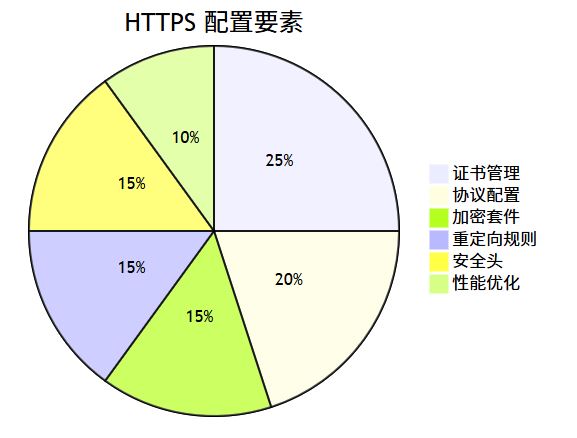
- 始终使用 https:即使是内部应用也应该使用 https
- 定期更新证书:设置提醒和自动化续期
- 使用强加密:禁用旧的 ssl/tls 版本和弱加密套件
- 启用 hsts:强制浏览器使用 https
- 监控证书到期:提前 30 天收到续期提醒
- 备份私钥:安全存储私钥,避免丢失
- 测试配置:使用在线工具测试 ssl 配置安全性
结语
配置 nginx https 证书看似复杂,但按照本文的步骤操作,你可以轻松为你的网站或应用启用安全的 https 连接。记住,安全不是一次性的工作,而是需要持续维护的过程。定期检查证书状态,更新加密配置,监控性能指标,才能确保你的应用始终保持安全可靠。
无论你是使用免费的 let’s encrypt 证书,还是购买商业证书,正确的配置都能为你的用户提供安全、快速的浏览体验。结合 java 应用的适当配置,你可以构建一个完整的端到端安全解决方案。
现在就开始为你的网站启用 https 吧!
以上就是在nginx上配置https证书的完整指南的详细内容,更多关于nginx配置https证书的资料请关注代码网其它相关文章!
赞 (0)
您想发表意见!!点此发布评论





发表评论