
Git误操作的急救方案
105人参与 • 2026-04-27 • 其他编程
摘要
本文系统讲解了git误操作后的恢复方法,分为四个核心部分:
- git对象模型: 解析blob、tree、commit、tag四种对象关系,理解引用与head机制,掌握垃圾回收原理(默认30天保留期)。
- reflog时光机: 详细演示通过reflog恢复误删分支、强制推送覆盖、重置丢失提交等场景,提供格式化查询和保留期配置技巧。
- reset与revert策略: 对比三种reset模式(–soft/–mixed/–hard)适用场景,详解revert创建安全撤销提交的方法,特别说明合并提交的特殊处理。
- 高级恢复实战: 包含误删文件恢复、分支指针修复、悬空对象找回等复杂场景,提供决策矩阵帮助选择最佳恢复策略。
全文强调 “黄金法则”: 只要未手动清除,git对象基本都能通过reflog或底层命令找回,并给出具体操作命令和风险提示。
本文提供系统化、实战导向、场景驱动的git误操作急救方案,涵盖从基础概念到高级恢复技巧的完整知识体系,让你在任何git灾难现场都能从容应对。
一、git对象模型与恢复原理
1.1 git内部对象模型
理解git的内部机制是成功恢复的基础:
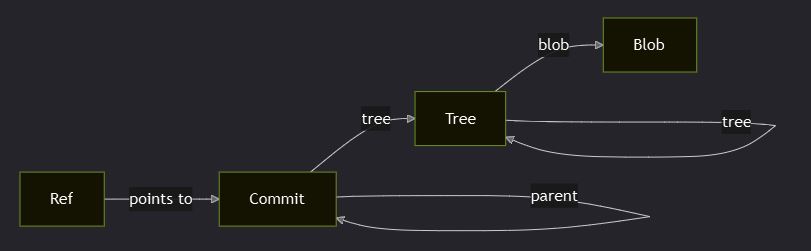
四种核心对象
- blob:文件内容(sha-1哈希)
- tree:目录结构(包含blob和子tree引用)
- commit:提交信息(包含tree、parent、author等)
- tag:标签对象(指向特定commit)
1.2 引用与head机制
head的三种状态
# 1. 指向分支(正常状态)
head -> refs/heads/main
# 2. 分离head状态(detached head)
head -> a1b2c3d (直接指向commit)
# 3. 初始状态(空仓库)
head -> (unborn)
引用类型
- head:当前工作区指向
- branch refs:
refs/heads/branch-name - remote refs:
refs/remotes/origin/branch-name - tag refs:
refs/tags/tag-name
1.3 git垃圾回收机制
对象生命周期
created → referenced → unreferenced → expired → gc'd
          ↑           ↑            ↑         ↑
        safe        recoverable  30天     deleted
                    (reflog)    (default)
关键时间窗口
- reflog保留期:默认90天(可配置)
- 未引用对象保留期:默认30天
- 垃圾回收触发:
git gc或自动触发
黄金法则:只要没运行git gc --prune=now,你的数据基本都能恢复!
二、reflog——你的git时光机
2.1 reflog基础操作
查看reflog
# 查看当前分支reflog
git reflog

# 查看特定分支reflog
git reflog show feature-branch

# 查看head reflog(最详细)
git reflog head

# 格式化输出(显示更多信息)
git log -g --oneline --decorate
reflog输出解析
# 示例输出
a1b2c3d head@{0}: commit: add new feature
b2c3d4e head@{1}: commit: fix bug in login
c3d4e5f head@{2}: checkout: moving from main to feature-branch
d4e5f6g head@{3}: commit: update documentation
- head@{0}:当前状态
- head@{1}:上一个状态
- head@{n}:n步之前的状态
2.2 reflog实战恢复场景
场景1:误删分支恢复
# 误操作:删除了重要分支
git branch -d feature-important

# 急救步骤:
# 1. 查找分支最后的commit
git reflog | grep "feature-important"

# 2. 重新创建分支
git checkout -b feature-important <commit-hash>

# 或者使用reflog索引
git checkout -b feature-important head@{2}
场景2:强制推送后恢复
# 误操作:强制推送覆盖了远程历史
git push --force origin main

# 急救步骤:
# 1. 在其他协作者机器上获取原始引用
git fetch origin
git reflog origin/main

# 2. 恢复本地分支
git reset --hard origin/main@{1}

# 3. 重新强制推送正确的状态
git push --force-with-lease origin main
场景3:重置后恢复丢失的提交
# 误操作:硬重置丢失了多个提交
git reset --hard head~3

# 急救步骤:
# 1. 查看reflog找到丢失的提交
git reflog

# 2. 创建新分支指向丢失的提交
git checkout -b recovery-branch head@{1}

# 3. 合并或变基回主分支
git checkout main
git merge recovery-branch
2.3 reflog高级技巧
配置reflog保留策略
# 延长reflog保留时间
git config gc.reflogexpire 180.days
git config gc.reflogexpireunreachable 90.days

# 全局配置
git config --global gc.reflogexpire 365.days

# 查看当前配置
git config --get-regexp gc.reflog
批量恢复分析
# 查找特定时间段的活动
git reflog --since="2 days ago" --until="1 hour ago"

# 查找包含特定消息的提交
git reflog --grep="hotfix"

# 查找特定作者的操作
git reflog --author="john@example.com"
三、reset vs revert——修复策略选择指南
3.1 reset命令深度解析
三种reset模式对比
| 模式 | 工作区 | 暂存区 | 分支指针 | 使用场景 |
|---|---|---|---|---|
| –soft | 保持不变 | 保持不变 | 移动 | 合并多个提交 |
| –mixed | 保持不变 | 重置为指定commit | 移动 | 修改最近提交 |
| –hard | 重置为指定commit | 重置为指定commit | 移动 | 完全丢弃更改 |
reset实战示例
场景1:合并多个提交(–soft)
# 当前历史:a-b-c-d (想合并c和d)
git reset --soft head~2
git commit -m "combined commits c and d"
# 结果:a-b-e
场景2:修改最近提交内容(–mixed)
# 发现最近提交有错误
git reset --mixed head~1
# 修改文件
git add .
git commit -m "fixed previous commit"
场景3:完全回退到历史状态(–hard)
# 紧急回滚到稳定版本
git reset --hard a1b2c3d
# 注意:这会丢失所有未提交的更改!
3.2 revert命令安全修复
revert vs reset核心区别
- revert:创建新提交来撤销更改(安全,可推送到共享仓库)
- reset:移动分支指针(危险,不应在共享分支上使用)
revert实战示例
场景1:撤销单个提交
# 撤销特定提交(创建新提交)
git revert a1b2c3d

# 撤销但不自动提交(手动调整)
git revert --no-commit a1b2c3d
# 手动修改后提交
git commit -m "revert problematic changes with adjustments"
场景2:撤销合并提交
# 撤销合并提交需要指定父提交
git revert -m 1 merge-commit-hash

# -m 1 表示保留第一个父提交的更改
# -m 2 表示保留第二个父提交的更改
场景3:批量撤销多个提交
# 撤销连续的多个提交
git revert head~3..head

# 交互式撤销(逐个确认)
git revert --interactive head~3..head
3.3 修复策略决策矩阵
| 场景 | 推荐策略 | 风险等级 | 协作影响 |
|---|---|---|---|
| 本地未推送的提交 | reset --soft/mixed | 低 | 无 |
| 已推送到共享分支 | revert | 无 | 安全 |
| 紧急生产修复 | revert + hotfix | 低 | 安全 |
| 清理本地实验分支 | reset --hard | 中 | 仅本地 |
| 重写历史(私有分支) | reset + force push | 高 | 需协调 |
| 撤销合并冲突解决 | revert -m | 中 | 需测试 |
四、高级恢复场景实战
4.1 误删文件恢复
场景1:未暂存的文件被删除
# 文件还在工作区但被删除
# 如果刚删除,可能还在文件系统缓存中
# 否则需要从最近提交恢复

# 从head恢复特定文件
git checkout head -- path/to/file.txt

# 从特定提交恢复
git checkout a1b2c3d -- path/to/file.txt

# 从reflog恢复
git checkout head@{1} -- path/to/file.txt
场景2:已暂存但未提交的文件丢失
# 查找暂存区的对象
git fsck --lost-found

# 查看丢失的对象
ls .git/lost-found/other/

# 手动恢复文件(需要知道文件名和内容)
git show <blob-hash> > recovered-file.txt
4.2 强制推送灾难恢复
场景:覆盖了团队的共享历史
# 步骤1:立即通知团队停止工作
# 步骤2:从其他团队成员获取正确历史

# 在同事的机器上:
git fetch origin
git bundle create backup.bundle main

# 步骤3:恢复你的本地仓库
git pull /path/to/backup.bundle main

# 步骤4:重新推送(使用--force-with-lease更安全)
git push --force-with-lease origin main
预防措施
# 禁止在主分支强制推送
git config receive.denynonfastforwards true

# 使用更安全的强制推送
git push --force-with-lease  # 只有在远程没有新提交时才强制推送

# 设置别名避免误操作
git config --global alias.push-safe 'push --force-with-lease'
4.3 合并冲突后的混乱恢复
场景:合并过程中手动修改导致混乱
# 步骤1:取消当前合并
git merge --abort

# 如果merge --abort不可用(已经提交了合并)
# 步骤2:重置到合并前状态
git reflog
git reset --hard head@{2}  # 假设head@{2}是合并前状态

# 步骤3:重新执行合并
git merge feature-branch

# 步骤4:使用正确的冲突解决策略
# 使用mergetool辅助解决
git config --global merge.tool vimdiff
git mergetool
4.4 变基(rebase)灾难恢复
场景:变基过程中出现严重问题
# git在变基开始时会创建备份引用
git show-ref orig_head

# 恢复到变基前状态
git reset --hard orig_head

# 如果orig_head不存在,使用reflog
git reflog
git reset --hard head@{n}  # 找到变基前的提交
变基安全实践
# 在变基前创建备份分支
git checkout -b backup-before-rebase

# 使用交互式变基更安全
git rebase -i head~5

# 变基后验证再推送
git log --oneline --graph
# 确认无误后再推送
五、预防性最佳实践
5.1 安全配置清单
git全局安全配置
# 禁用自动垃圾回收(给恢复留更多时间)
git config --global gc.auto 0

# 延长reflog保留时间
git config --global gc.reflogexpire 365.days
git config --global gc.reflogexpireunreachable 180.days

# 启用更安全的强制推送
git config --global push.default simple

# 设置别名避免危险操作
git config --global alias.undo 'reset --soft head~1'
git config --global alias.safe-reset 'checkout head --'
仓库级保护配置
# .git/config 保护设置
[receive]
    denynonfastforwards = true
    denydeletes = true

[gc]
    reflogexpire = 365.days
    reflogexpireunreachable = 180.days
5.2 工作流程安全规范
提交前检查清单
- 运行测试确保代码正常
- 检查暂存文件是否正确 (
git status) - 验证提交信息格式
- 确认分支名称正确
推送前安全检查
# 检查将要推送的内容
git push --dry-run origin main

# 查看推送差异
git diff origin/main..main

# 确认没有意外的大文件
git ls-files --others --exclude-standard
危险操作防护
# 重写历史前的防护脚本
#!/bin/bash
# safe-rewrite.sh
branch=$(git branch --show-current)
timestamp=$(date +%y%m%d-%h%m%s)
backup_branch="backup-${branch}-${timestamp}"

echo "creating backup branch: $backup_branch"
git checkout -b $backup_branch
git checkout $branch

echo "backup created. proceed with rewrite operation..."
# 执行危险操作
5.3 自动化备份策略
本地自动备份
# 定期备份脚本
#!/bin/bash
# git-backup.sh
repo_name=$(basename $(pwd))
backup_dir="/backup/git/$repo_name"
timestamp=$(date +%y%m%d-%h%m%s)

# 创建bundle备份
git bundle create "$backup_dir/backup-$timestamp.bundle" --all

# 清理旧备份(保留7天)
find "$backup_dir" -name "*.bundle" -mtime +7 -delete
远程镜像备份
# 创建镜像仓库
git clone --mirror original-repo mirror-repo

# 定期同步
cd mirror-repo
git remote update

# 或者使用钩子自动同步
# .git/hooks/post-receive
#!/bin/bash
git remote update mirror-origin
六、急救工具箱
6.1 快速诊断命令集
状态快速检查
# 一行命令查看关键状态
git status && git log --oneline -5 && git reflog -3

# 检查是否有未推送的提交
git log origin/main..main

# 检查是否有未拉取的提交
git log main..origin/main

# 查看所有分支和远程状态
git branch -vva
对象查找工具
# 查找丢失的对象
git fsck --full --unreachable --lost-found

# 查看特定对象内容
git show <object-hash>

# 查找包含特定内容的提交
git log -s "specific code or text"

# 查找特定文件的历史
git log --follow -- path/to/file
6.2 紧急联系人清单
团队协作恢复流程
- 立即停止:发现误操作后立即停止所有git操作
- 评估影响:确定影响范围(本地/远程,个人/团队)
- 通知团队:如果是共享仓库问题,立即通知相关成员
- 收集信息:从其他团队成员处收集正确的仓库状态
- 执行恢复:按照本文指南执行相应的恢复操作
- 验证结果:确认恢复后的状态正确无误
- 总结经验:记录事故原因和解决方案,防止再次发生
七、总结与黄金法则
核心恢复原则回顾
- 不要恐慌:git的设计保证了数据很难真正丢失
- 先诊断后操作:使用reflog和fsck了解当前状态
- 本地vs远程区分:本地问题用reset,远程问题用revert
- 备份优先:在执行危险操作前先创建备份
- 预防胜于治疗:建立安全的工作流程和配置
黄金法则
“git never loses your data, it just hides it really well.” —— git philosophy
记住这些关键命令:
git reflog- 你的时光机git revert- 安全的撤销工具git reset --soft- 合并提交的利器git checkout <commit> -- <file>- 文件级别的恢复git fsck --lost-found- 最后的救命稻草
通过本文的系统化指南,你现在已经具备了处理任何git误操作的能力。实践是最好的老师,建议在测试仓库中练习这些技巧,这样在真实紧急情况下就能从容应对!
以上就是git误操作的急救方案的详细内容,更多关于git误操作急救方法的资料请关注代码网其它相关文章!
赞 (0)
您想发表意见!!点此发布评论




发表评论