
Qt实现屏幕截图小工具的完整指南
12人参与 • 2026-08-06 • C/C++
一、效果展示
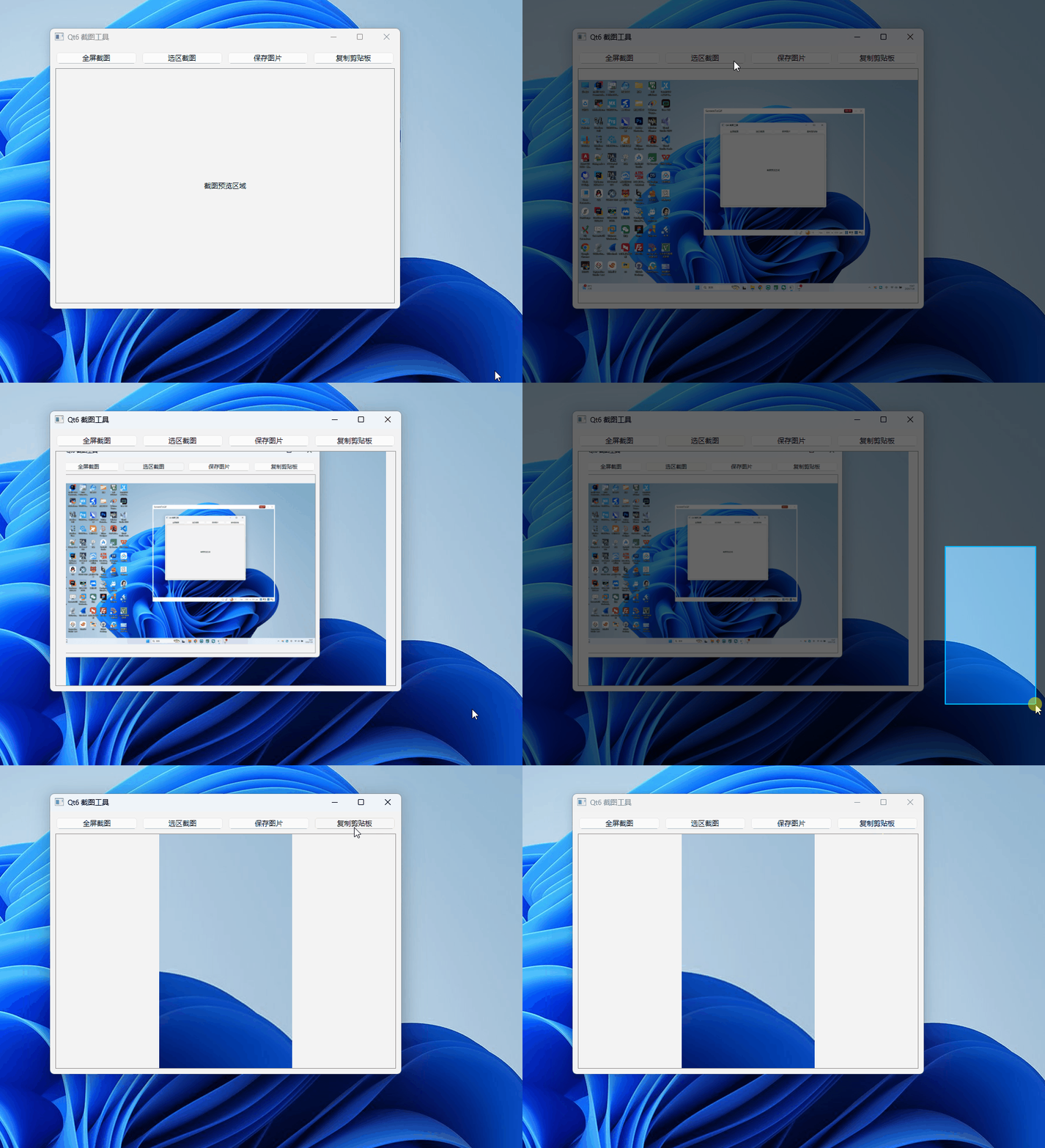
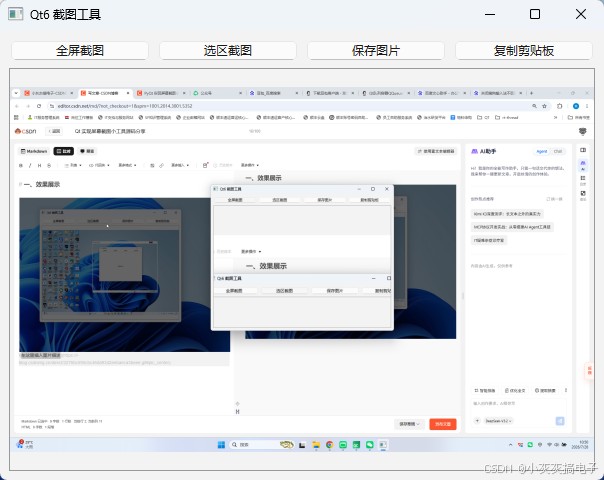
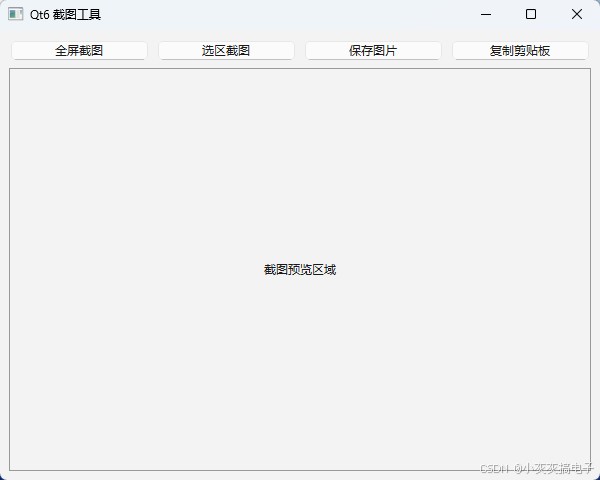
二、源码分享
1、mainwindow.h
#ifndef mainwindow_h
#define mainwindow_h

#include <qmainwindow>
#include <qpixmap>
#include <qscreen>
#include <qfiledialog>
#include <qclipboard>
#include <qpainter>
#include <qmouseevent>

qt_begin_namespace
namespace ui { class mainwindow; }
qt_end_namespace

// 选区截图全屏遮罩窗口
class capturemask : public qwidget
{
    q_object
public:
    explicit capturemask(qwidget *parent = nullptr);
    void setscreenpix(const qpixmap &pix);

protected:
    void paintevent(qpaintevent *) override;
    void mousepressevent(qmouseevent *event) override;
    void mousemoveevent(qmouseevent *event) override;
    void mousereleaseevent(qmouseevent *event) override;

signals:
    void capturefinished(const qpixmap &pix);

private:
    qpixmap m_screenbg;
    qpoint m_startpos;
    qpoint m_endpos;
    bool m_isdragging = false;
};

class mainwindow : public qmainwindow
{
    q_object
public:
    mainwindow(qwidget *parent = nullptr);
    ~mainwindow() override;

private slots:
    // 全屏截图
    void slotcapturefull();
    // 选区截图
    void slotcapturearea();
    // 截图完成回调
    void slotoncapturedone(const qpixmap &pix);
    // 保存图片
    void slotsaveimage();
    // 复制到剪贴板
    void slotcopyclipboard();

private:
    ui::mainwindow *ui;
    qpixmap m_capturepix; // 当前截图缓存
};

#endif // mainwindow_h
2、mainwindow.cpp
#include "mainwindow.h"
#include "ui_mainwindow.h"
#include <qapplication>
#include <qmessagebox>
#include <qdatetime>

capturemask::capturemask(qwidget *parent)
    : qwidget(parent, qt::window | qt::framelesswindowhint | qt::windowstaysontophint)
{
    setattribute(qt::wa_deleteonclose);
    setattribute(qt::wa_translucentbackground, false);
    setautofillbackground(false);
}

void capturemask::setscreenpix(const qpixmap &pix)
{
    m_screenbg = pix;
    qrect screenrect = qapplication::primaryscreen()->geometry();
    this->setgeometry(screenrect);
    this->showfullscreen();
}

void capturemask::paintevent(qpaintevent *)
{
    qpainter painter(this);
    painter.setrenderhint(qpainter::antialiasing);

    // ========== 绘制逻辑:原图在上,暗色遮罩覆盖,选区挖空 ==========
    // 1. 先绘制完整原图
    painter.drawpixmap(rect(), m_screenbg);

    // 2. 全局绘制半透明黑色遮罩(全覆盖变暗)
    qcolor darkcolor(0, 0, 0, 150);
    painter.fillrect(rect(), darkcolor);

    if (m_isdragging)
    {
        qrect selectrect = qrect(m_startpos, m_endpos).normalized();

        // 3. 在选区重新绘制原图,覆盖掉黑色遮罩,实现框内高亮
        painter.drawpixmap(selectrect, m_screenbg, selectrect);

        // 4. 绘制选区边框与填充
        painter.setpen(qpen(qcolor(0, 180, 255), 2));
        painter.setbrush(qcolor(0, 160, 255, 60));
        painter.drawrect(selectrect);
    }
}

void capturemask::mousepressevent(qmouseevent *event)
{
    m_isdragging = true;
    m_startpos = event->pos();
    m_endpos = m_startpos;
    update();
}

void capturemask::mousemoveevent(qmouseevent *event)
{
    if (!m_isdragging) return;
    m_endpos = event->pos();
    update();
}

void capturemask::mousereleaseevent(qmouseevent *)
{
    m_isdragging = false;
    qrect rect = qrect(m_startpos, m_endpos).normalized();
    qpixmap result = m_screenbg.copy(rect);
    emit capturefinished(result);
    this->close();
}

// ================= mainwindow =================
mainwindow::mainwindow(qwidget *parent)
    : qmainwindow(parent)
    , ui(new ui::mainwindow)
{
    ui->setupui(this);
    this->setwindowtitle("qt6 截图工具");
    this->resize(600, 450);
}

mainwindow::~mainwindow()
{
    delete ui;
}

void mainwindow::slotcapturefull()
{
    qscreen *screen = qapplication::primaryscreen();
    m_capturepix = screen->grabwindow(0);
    slotoncapturedone(m_capturepix);
}

void mainwindow::slotcapturearea()
{
    capturemask *mask = new capturemask(this);
    qscreen *screen = qapplication::primaryscreen();
    qpixmap fullpix = screen->grabwindow(0);
    mask->setscreenpix(fullpix);

    connect(mask, &capturemask::capturefinished,
            this, &mainwindow::slotoncapturedone);
}

void mainwindow::slotoncapturedone(const qpixmap &pix)
{
    m_capturepix = pix;
    // 显示截图到label,自动缩放
    ui->label_view->setpixmap(pix.scaled(ui->label_view->size(), qt::keepaspectratio, qt::smoothtransformation));
}

void mainwindow::slotsaveimage()
{
    if (m_capturepix.isnull())
    {
        qmessagebox::information(this, "提示", "请先截图!");
        return;
    }
    qstring timestr = qdatetime::currentdatetime().tostring("yyyymmdd_hhmmss");
    qstring path = qfiledialog::getsavefilename(this, "保存截图",
                                                qstring("./%1.png").arg(timestr),
                                                "png图片(*.png);;jpg图片(*.jpg)");
    if (!path.isempty())
    {
        m_capturepix.save(path);
        qmessagebox::information(this, "成功", "图片已保存");
    }
}

void mainwindow::slotcopyclipboard()
{
    if (m_capturepix.isnull())
    {
        qmessagebox::information(this, "提示", "请先截图!");
        return;
    }
    qapplication::clipboard()->setpixmap(m_capturepix);
    qmessagebox::information(this, "成功", "截图已复制到剪贴板");
}
3、mainwindow.ui
<?xml version="1.0" encoding="utf-8"?>
<ui version="4.0">
 <class>mainwindow</class>
 <widget class="qmainwindow" name="mainwindow">
  <property name="geometry">
   <rect>
    <x>0</x>
    <y>0</y>
    <width>600</width>
    <height>450</height>
   </rect>
  </property>
  <widget class="qwidget" name="centralwidget">
   <layout class="qvboxlayout" name="verticallayout">
    <item>
     <layout class="qhboxlayout" name="horizontallayout">
      <item>
       <widget class="qpushbutton" name="btn_full">
        <property name="text">
         <string>全屏截图</string>
        </property>
       </widget>
      </item>
      <item>
       <widget class="qpushbutton" name="btn_area">
        <property name="text">
         <string>选区截图</string>
        </property>
       </widget>
      </item>
      <item>
       <widget class="qpushbutton" name="btn_save">
        <property name="text">
         <string>保存图片</string>
        </property>
       </widget>
      </item>
      <item>
       <widget class="qpushbutton" name="btn_copy">
        <property name="text">
         <string>复制剪贴板</string>
        </property>
       </widget>
      </item>
     </layout>
    </item>
    <item>
     <widget class="qlabel" name="label_view">
      <property name="minimumsize">
       <size>
        <width>0</width>
        <height>300</height>
       </size>
      </property>
      <property name="stylesheet">
       <string notr="true">border:1px solid #999;</string>
      </property>
      <property name="text">
       <string>截图预览区域</string>
      </property>
      <property name="alignment">
       <set>qt::alignmentflag::aligncenter</set>
      </property>
     </widget>
    </item>
   </layout>
  </widget>
 </widget>
 <resources/>
 <connections>
  <connection>
   <sender>btn_full</sender>
   <signal>clicked()</signal>
   <receiver>mainwindow</receiver>
   <slot>slotcapturefull()</slot>
   <hints>
    <hint type="sourcelabel">
     <x>20</x>
     <y>20</y>
    </hint>
    <hint type="destinationlabel">
     <x>20</x>
     <y>20</y>
    </hint>
   </hints>
  </connection>
  <connection>
   <sender>btn_area</sender>
   <signal>clicked()</signal>
   <receiver>mainwindow</receiver>
   <slot>slotcapturearea()</slot>
   <hints>
    <hint type="sourcelabel">
     <x>20</x>
     <y>20</y>
    </hint>
    <hint type="destinationlabel">
     <x>20</x>
     <y>20</y>
    </hint>
   </hints>
  </connection>
  <connection>
   <sender>btn_save</sender>
   <signal>clicked()</signal>
   <receiver>mainwindow</receiver>
   <slot>slotsaveimage()</slot>
   <hints>
    <hint type="sourcelabel">
     <x>20</x>
     <y>20</y>
    </hint>
    <hint type="destinationlabel">
     <x>20</x>
     <y>20</y>
    </hint>
   </hints>
  </connection>
  <connection>
   <sender>btn_copy</sender>
   <signal>clicked()</signal>
   <receiver>mainwindow</receiver>
   <slot>slotcopyclipboard()</slot>
   <hints>
    <hint type="sourcelabel">
     <x>20</x>
     <y>20</y>
    </hint>
    <hint type="destinationlabel">
     <x>20</x>
     <y>20</y>
    </hint>
   </hints>
  </connection>
 </connections>
 <slots>
  <slot>slotcapturefull()</slot>
  <slot>slotcapturearea()</slot>
  <slot>slotoncapturedone(const qpixmap&)</slot>
  <slot>slotsaveimage()</slot>
  <slot>slotcopyclipboard()</slot>
 </slots>
</ui>
三、实现原理
本截图工具的核心实现依赖于 qt6 的事件系统(event system)和绘图系统(painting system)。下面详细解析关键事件的工作原理:
1、qt6 事件系统概述
qt 采用事件驱动的编程模型,所有用户交互(鼠标点击、键盘输入、窗口重绘等)都通过事件(event)来传递和处理。事件处理流程如下:
- 事件产生:由操作系统或 qt 内部产生
- 事件派发:通过
qapplication::notify()派发到目标对象 - 事件过滤:可通过
installeventfilter()进行预处理 - 事件处理:目标对象的
event()方法接收并分发给特定事件处理器
2、截图工具中的关键事件详解
paintevent - 绘图事件
void capturemask::paintevent(qpaintevent *)
{
    qpainter painter(this);
    painter.setrenderhint(qpainter::antialiasing);

    // 1. 绘制完整屏幕截图作为背景
    painter.drawpixmap(rect(), m_screenbg);

    // 2. 全局半透明黑色遮罩(实现变暗效果)
    qcolor darkcolor(0, 0, 0, 150);  // rgba: 黑色,透明度150/255
    painter.fillrect(rect(), darkcolor);

    if (m_isdragging)
    {
        qrect selectrect = qrect(m_startpos, m_endpos).normalized();

        // 3. 选区区域重新绘制原图(挖空效果)
        painter.drawpixmap(selectrect, m_screenbg, selectrect);

        // 4. 绘制选区边框和半透明填充
        painter.setpen(qpen(qcolor(0, 180, 255), 2));      // 蓝色边框
        painter.setbrush(qcolor(0, 160, 255, 60));        // 浅蓝色半透明填充
        painter.drawrect(selectrect);
    }
}
原理说明:
paintevent在以下情况自动触发:- 窗口首次显示
- 窗口被其他窗口遮挡后重新显示
- 调用
update()或repaint()方法 - 窗口大小改变
- 本工具中,每次鼠标移动(
mousemoveevent)都会调用update(),从而触发重绘 - 通过分层绘制实现选区高亮效果:
- 底层:完整屏幕截图
- 中层:全局半透明黑色遮罩(变暗效果)
- 上层:选区区域的原图(挖空效果)+ 蓝色边框
鼠标事件三部曲
mousepressevent - 鼠标按下
void capturemask::mousepressevent(qmouseevent *event)
{
    m_isdragging = true;                    // 开始拖拽状态
    m_startpos = event->pos();              // 记录起始位置
    m_endpos = m_startpos;                  // 初始结束位置=起始位置
    update();                               // 触发重绘(绘制起始点)
}
mousemoveevent - 鼠标移动
void capturemask::mousemoveevent(qmouseevent *event)
{
    if (!m_isdragging) return;              // 非拖拽状态不处理
    m_endpos = event->pos();                // 更新结束位置
    update();                               // 触发重绘(更新选区矩形)
}
mousereleaseevent - 鼠标释放
void capturemask::mousereleaseevent(qmouseevent *)
{
    m_isdragging = false;                   // 结束拖拽状态

    // 计算标准化矩形(确保左上角到右下角)
    qrect rect = qrect(m_startpos, m_endpos).normalized();

    // 从原图中截取选区
    qpixmap result = m_screenbg.copy(rect);

    // 发射信号通知截图完成
    emit capturefinished(result);

    // 关闭遮罩窗口
    this->close();
}
事件传递机制:
- qt 使用
qmouseevent封装鼠标事件信息 event->pos()返回相对于当前窗口的坐标normalized()确保矩形坐标是标准化的(左上角到右下角)
3、事件与信号槽的协同
事件处理流程
用户按下鼠标 → mousepressevent
↓
用户拖动鼠标 → mousemoveevent → update() → paintevent
↓
用户释放鼠标 → mousereleaseevent
↓
发射 capturefinished 信号 → mainwindow::slotoncapturedone
关键技术点
全屏遮罩窗口
// 窗口标志设置
qt::window |                    // 作为独立窗口
qt::framelesswindowhint |       // 无边框
qt::windowstaysontophint        // 始终置顶

// 窗口属性
setattribute(qt::wa_deleteonclose);         // 关闭时自动删除
setattribute(qt::wa_translucentbackground, false); // 不透明背景
屏幕捕获
// 获取主屏幕
qscreen *screen = qapplication::primaryscreen();

// 捕获整个屏幕(包括所有窗口)
qpixmap fullpix = screen->grabwindow(0);  // 0表示整个屏幕
图像处理
qpixmap::copy(const qrect &):截取指定区域qpixmap::save():保存到文件qclipboard::setpixmap():复制到剪贴板
4、qt6 事件系统的新特性
改进的事件过滤器:qt6 增强了事件过滤器的性能,支持更精细的事件拦截和处理。
手势事件支持:新增对触摸屏和手势的更好支持,虽然本工具未使用,但在移动端开发中很重要。
输入法事件优化:对多语言输入法的支持更加完善。
5、性能优化建议
减少不必要的重绘:
- 只在选区变化时调用
update() - 使用
update(qrect)只重绘脏区域
- 只在选区变化时调用
内存管理:
- 大尺寸截图及时释放
- 使用
qpixmapcache缓存常用图像
响应式设计:
- 在高dpi屏幕上使用
devicepixelratio适配 - 支持多屏幕截图
- 在高dpi屏幕上使用
到此这篇关于qt实现屏幕截图小工具的完整指南的文章就介绍到这了,更多相关qt屏幕截图内容请搜索代码网以前的文章或继续浏览下面的相关文章希望大家以后多多支持代码网!
赞 (0)
您想发表意见!!点此发布评论



发表评论