
Python difflib库实现文本差异比较与合并实战指南
2人参与 • 2026-08-07 • Python
引言:为什么需要文本差异比较?
在日常开发、代码审查、文档协作和日志分析中,我们经常需要比较两个文本的差异。手动逐行比对不仅效率低下,而且容易出错。python 标准库中的 difflib 模块正是为解决这一问题而生,它提供了一系列强大的工具,用于计算序列(尤其是字符串序列)之间的差异,并以多种直观的格式展示结果。
difflib 的核心算法基于 “最长公共子序列” 和 “ratcliff/obershelp 模式识别”,能够高效地找出文本的增、删、改操作。无论是生成代码补丁、对比配置文件版本,还是实现一个简单的在线文本差异查看器,difflib 都是你的得力助手。
核心类与方法概览
difflib 模块主要提供了以下几个类和函数:
| 类/函数 | 主要用途 | 输出格式 |
|---|---|---|
difflib.sequencematcher | 计算两个序列的相似度与差异块 | 原始差异数据 |
difflib.differ | 逐行比较文本,生成类 unix diff 命令的输出 | 带 +, -, ? 标记的文本 |
difflib.htmldiff | 生成高亮的 html 差异报告,适合网页展示 | html 表格 |
difflib.unified_diff | 生成 unified diff 格式的差异,广泛用于代码版本控制 | unified diff 文本 |
difflib.context_diff | 生成 context diff 格式的差异 | context diff 文本 |
difflib.ndiff | 类似 differ,但输出更紧凑 | 紧凑的差异文本 |
difflib.get_close_matches | 在列表中查找与目标词最相似的匹配项 | 匹配字符串列表 |
接下来,我们将逐一深入探讨。
基础比较:sequencematcher 与相似度计算
sequencematcher 是 difflib 的基石。它不直接生成可读的差异报告,而是计算出两个序列之间的匹配块,并提供了计算相似度比率的方法。
基本使用
import difflib

text1 = "python is great for data analysis."
text2 = "python is great for web development and data analysis."

# 创建 sequencematcher 对象
matcher = difflib.sequencematcher(none, text1, text2)

# 计算相似度比率 (0.0 到 1.0)
ratio = matcher.ratio()
print(f"相似度比率: {ratio:.2f}")  # 输出: 相似度比率: 0.78

# 获取匹配块
# 每个块是一个三元组 (i, j, n),表示 text1[i:i+n] == text2[j:j+n]
matching_blocks = matcher.get_matching_blocks()
print("匹配块:")
for block in matching_blocks:
    i, j, n = block
    if n:  # 忽略长度为 0 的块
        print(f"  text1[{i}:{i+n}] == text2[{j}:{j+n}] -> '{text1[i:i+n]}'")
输出示例
c:\users\徐鹏\desktop\55\.venv\scripts\python.exe c:\users\徐鹏\desktop\55\main.py
相似度比率: 0.77
匹配块:
text1[0:20] == text2[0:20] -> 'python is great for '
text1[20:34] == text2[40:54] -> 'data analysis.'
进程已结束,退出代码为 0
理解匹配块与差异
get_matching_blocks() 返回的是两个序列中完全相同的部分。差异部分则位于这些匹配块之间。sequencematcher 还提供了 get_opcodes() 方法,它能更清晰地告诉我们为了将序列 a 转换为序列 b 需要执行哪些操作。
a = ["apple", "banana", "cherry", "date"]
b = ["apple", "blueberry", "cherry", "elderberry"]

matcher = difflib.sequencematcher(none, a, b)
opcodes = matcher.get_opcodes()

print("操作码 (tag, i1, i2, j1, j2):")
for tag, i1, i2, j1, j2 in opcodes:
    print(f"  {tag:7} a[{i1}:{i2}] -> b[{j1}:{j2}]", end=" ")
    if tag == 'equal':
        print(f" (内容相同: {a[i1:i2]})")
    elif tag == 'replace':
        print(f" (将 {a[i1:i2]} 替换为 {b[j1:j2]})")
    elif tag == 'delete':
        print(f" (删除 {a[i1:i2]})")
    elif tag == 'insert':
        print(f" (插入 {b[j1:j2]})")
输出示例:
操作码 (tag, i1, i2, j1, j2):
equal a[0:1] -> b[0:1] (内容相同: ['apple'])
replace a[1:2] -> b[1:2] (将 ['banana'] 替换为 ['blueberry'])
equal a[2:3] -> b[2:3] (内容相同: ['cherry'])
replace a[3:4] -> b[3:4] (将 ['date'] 替换为 ['elderberry'])
生成可读的差异报告
sequencematcher 提供了底层数据,但通常我们需要更直观的输出。differ, unified_diff 和 context_diff 就是为此设计的。
使用 differ 类
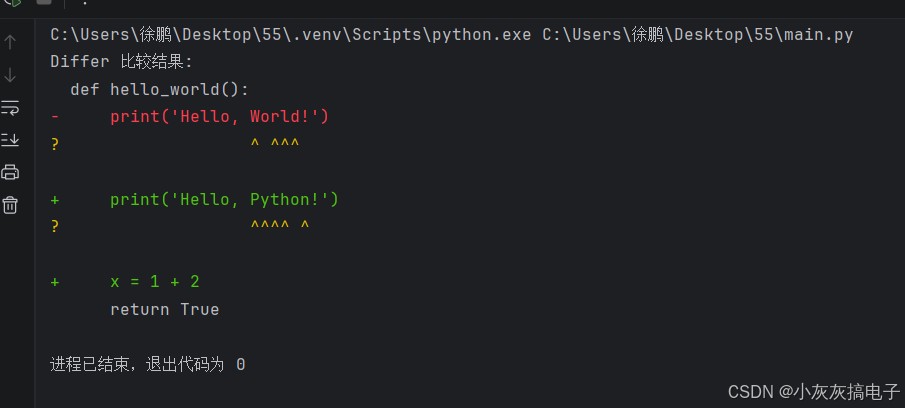
differ 生成的行级差异标记与 unix diff 命令类似:
' '(空格):两行相同'-':仅存在于第一个序列(被删除)'+':仅存在于第二个序列(被添加)'?':指示行内具体字符的增删(需要设置linejunk和charjunk参数为none来启用)
from difflib import differ

text1_lines = [
    "def hello_world():",
    "    print('hello, world!')",
    "    return true"
]
text2_lines = [
    "def hello_world():",
    "    print('hello, python!')",
    "    x = 1 + 2",
    "    return true"
]

d = differ()
diff = list(d.compare(text1_lines, text2_lines))

print("differ 比较结果:")
for line in diff:
    # 根据前缀添加颜色或样式(此处用符号表示)
    if line.startswith('-'):
        print(f"\033[91m{line}\033[0m")  # 红色表示删除
    elif line.startswith('+'):
        print(f"\033[92m{line}\033[0m")  # 绿色表示新增
    elif line.startswith('?'):
        print(f"\033[93m{line}\033[0m")  # 黄色表示行内变化提示
    else:
        print(line)
输出示例:
生成 unified diff(最常用)
unified diff 格式是 git 等版本控制系统使用的标准补丁格式。它非常紧凑,包含了上下文行。
from difflib import unified_diff
import sys

# 假设我们有两个版本的代码片段
original = """def calculate_sum(a, b):
    result = a + b
    print(f"the sum is {result}")
    return result
"""

modified = """def calculate_sum(a, b):
    # 计算两数之和
    total = a + b
    print(f"the sum is {total}")
    return total
"""

diff_lines = unified_diff(
    original.splitlines(keepends=true),
    modified.splitlines(keepends=true),
    fromfile='original.py',
    tofile='modified.py',
    lineterm='\n'  # 确保行尾是换行符
)

print("unified diff 格式:")
sys.stdout.writelines(diff_lines)
输出示例:
--- original.py
+++ modified.py
@@ -1,5 +1,6 @@
def calculate_sum(a, b):
- result = a + b
+ # 计算两数之和
+ total = a + b
- print(f"the sum is {result}")
+ print(f"the sum is {total}")
- return result
+ return total
@@ -1,5 +1,6 @@表示原始文件从第1行开始的5行,被修改为从第1行开始的6行。-开头的行表示在原始文件中被删除。+开头的行表示在新文件中被添加。
生成 context diff
context diff 格式比 unified diff 更冗长,但提供了更多上下文,曾经是 patch 命令的默认格式。
from difflib import context_diff

diff = context_diff(
    a=original.splitlines(keepends=true),
    b=modified.splitlines(keepends=true),
    fromfile='old_version',
    tofile='new_version',
)

print("context diff 格式 (前几行):")
for i, line in enumerate(diff):
    if i > 15:  # 只打印一部分
        break
    print(line, end='')
高级应用:生成 html 差异报告
htmldiff 类可以生成一个完整的 html 页面,用颜色高亮显示差异,非常适合集成到 web 应用中。
from difflib import htmldiff

html_diff = htmldiff(wrapcolumn=60)  # wrapcolumn 可控制换行宽度

# 生成 html 表格
html_table = html_diff.make_table(
    fromlines=original.splitlines(),
    tolines=modified.splitlines(),
    fromdesc='原始版本',
    todesc='修改版本',
    context=true,  # 显示上下文
    numlines=3     # 上下文的行数
)

# 生成完整 html 页面
full_html = html_diff.make_file(
    fromlines=original.splitlines(),
    tolines=modified.splitlines(),
    fromdesc='original',
    todesc='modified'
)

# 将 html 保存到文件,方便查看
with open('diff_report.html', 'w', encoding='utf-8') as f:
    f.write(full_html)

print("html 差异报告已生成到 'diff_report.html',请在浏览器中打开查看。")
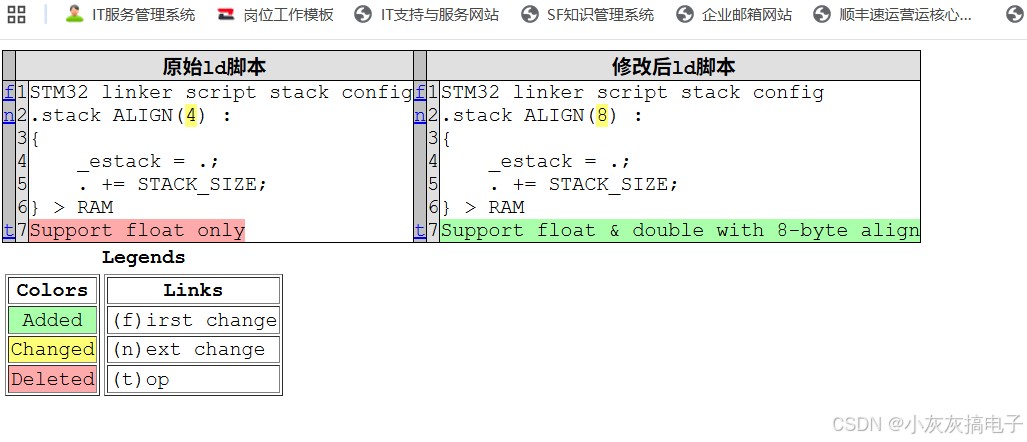
生成的 html 页面会以并排表格的形式展示,新增行为绿色背景,删除行为红色背景,修改行则会有黄底色提示,非常直观。
实用技巧与函数
模糊匹配:get_close_matches
get_close_matches 是一个非常实用的函数,它能在列表中快速找到与目标词最相似的几个匹配项。其核心是 sequencematcher.ratio()。
from difflib import get_close_matches

candidates = ['apple', 'application', 'apply', 'appliance', 'banana', 'cherry']
word = 'appel'

# 找出前3个最相似的词
matches = get_close_matches(word, candidates, n=3, cutoff=0.6)
print(f"与 '{word}' 最相似的词: {matches}")
# 输出: 与 'appel' 最相似的词: ['apple', 'apply', 'application']

# 应用场景:命令行工具的命令纠错
available_commands = ['start', 'stop', 'status', 'restart', 'config']
user_input = 'statu'
suggestion = get_close_matches(user_input, available_commands, n=1, cutoff=0.5)
if suggestion:
    print(f"您想输入的是 '{suggestion[0]}' 吗?")
输出示例
与 'appel' 最相似的词: ['apply', 'apple']
您想输入的是 'status' 吗?
忽略“垃圾”字符
在比较时,有时我们希望忽略空格、标点或特定字符。可以通过自定义 isjunk 函数来实现。
import difflib
import string

def ignore_punctuation_and_space(s):
    """移除标点和空格"""
    return s.translate(str.maketrans('', '', string.punctuation + ' '))

text1 = "hello, world!"
text2 = "hello world"

matcher = difflib.sequencematcher(
    lambda x: x in " ,!",  # isjunk 函数:认为空格、逗号、叹号是“垃圾”
    text1,
    text2
)
print(f"忽略部分字符后的相似度: {matcher.ratio():.2f}")  # 可能更高

# 另一种方式:预处理文本
clean1 = ignore_punctuation_and_space(text1)
clean2 = ignore_punctuation_and_space(text2)
matcher2 = difflib.sequencematcher(none, clean1, clean2)
print(f"完全清理后的相似度: {matcher2.ratio():.2f}")
输出示例
忽略部分字符后的相似度: 0.92
完全清理后的相似度: 1.00
实战案例:一个简单的文件差异比较工具
让我们综合运用以上知识,构建一个命令行文件比较工具。
#!/usr/bin/env python3
"""
file_diff_tool.py - 一个简单的文件差异比较工具
用法: python file_diff_tool.py <file1> <file2> [--format {unified,context,html}]
"""

import difflib
import argparse
import sys

def compare_files(file1_path, file2_path, diff_format='unified'):
    """比较两个文件并输出差异"""
    try:
        with open(file1_path, 'r', encoding='utf-8') as f1, \
             open(file2_path, 'r', encoding='utf-8') as f2:
            lines1 = f1.readlines()
            lines2 = f2.readlines()
    except filenotfounderror as e:
        print(f"错误: 文件未找到 - {e}", file=sys.stderr)
        return false
    except unicodedecodeerror:
        print("错误: 文件编码可能不是 utf-8,请尝试其他编码。", file=sys.stderr)
        return false

    if diff_format == 'unified':
        diff_lines = difflib.unified_diff(
            lines1, lines2,
            fromfile=file1_path,
            tofile=file2_path,
            lineterm='\n'
        )
        sys.stdout.writelines(diff_lines)
    elif diff_format == 'context':
        diff_lines = difflib.context_diff(
            lines1, lines2,
            fromfile=file1_path,
            tofile=file2_path,
            lineterm='\n'
        )
        sys.stdout.writelines(diff_lines)
    elif diff_format == 'html':
        html_diff = difflib.htmldiff()
        html_content = html_diff.make_file(
            lines1, lines2,
            fromdesc=file1_path,
            todesc=file2_path,
            context=true
        )
        output_file = f"diff_{file1_path}_{file2_path}.html"
        with open(output_file, 'w', encoding='utf-8') as f:
            f.write(html_content)
        print(f"html 差异报告已生成: {output_file}")
    else:
        print(f"不支持的格式: {diff_format}", file=sys.stderr)
        return false

    return true

def main():
    parser = argparse.argumentparser(description='比较两个文本文件的差异')
    parser.add_argument('file1', help='第一个文件路径')
    parser.add_argument('file2', help='第二个文件路径')
    parser.add_argument('--format', choices=['unified', 'context', 'html'],
                        default='unified', help='差异输出格式 (默认: unified)')
    args = parser.parse_args()

    success = compare_files(args.file1, args.file2, args.format)
    sys.exit(0 if success else 1)

if __name__ == '__main__':
    main()
使用示例:
# 生成 unified diff
python file_diff_tool.py old_code.py new_code.py
# 生成 context diff
python file_diff_tool.py old_code.py new_code.py --format context
# 生成 html 报告
python file_diff_tool.py old_code.py new_code.py --format html
总结
difflib 是 python 标准库中一个强大而实用的模块,它使得文本差异比较变得简单高效。通过本文,你应该掌握了:
- 核心类与函数:
sequencematcher,differ,htmldiff,unified_diff等的用途与区别。 - 差异格式:理解并能够生成 unified diff、context diff 和 html 报告。
- 实用技巧:使用
get_close_matches进行模糊匹配,通过isjunk参数忽略无关字符。 - 实战应用:能够构建自己的文件比较工具或集成到其他应用中。
最佳实践建议:
- 对于代码版本比较,优先使用
unified_diff,因为它最紧凑且被广泛支持。 - 需要在 web 页面展示差异时,
htmldiff是最佳选择。 - 进行模糊搜索或拼写检查时,别忘了
get_close_matches。 - 处理大文件时,注意内存消耗,可以考虑逐块读取比较。
完整代码
import difflib

# 两段stm32链接脚本文本(和rust示例一致)
old_text = """stm32 linker script stack config
.stack align(4) :
{
    _estack = .;
    . += stack_size;
} > ram
support float only
"""

new_text = """stm32 linker script stack config
.stack align(8) :
{
    _estack = .;
    . += stack_size;
} > ram
support float & double with 8-byte align
"""

# 按行切分成列表
old_lines = old_text.splitlines()
new_lines = new_text.splitlines()

print("=" * 60)
print("1. 简易行对比(ndiff,带 +/- 标记)")
print("=" * 60)
diff_ndiff = difflib.ndiff(old_lines, new_lines)
for line in diff_ndiff:
    # 标记说明:- 删除行、+新增行、 不变行、?字符改动提示
    if line.startswith("-"):
        print(f"\033[31m{line}\033[0m")  # 红色删除
    elif line.startswith("+"):
        print(f"\033[32m{line}\033[0m")  # 绿色新增
    else:
        print(line)

print("\n" + "=" * 60)
print("2. git风格 unified 补丁格式(可保存为.patch文件)")
print("=" * 60)
# context=2 上下文显示2行
unified_diff = difflib.unified_diff(old_lines, new_lines, fromfile="original.ld", tofile="modified.ld", n=2)
patch_content = "\n".join(unified_diff)
print(patch_content)

# 保存补丁到文件
with open("stack_align.patch", "w", encoding="utf-8") as f:
    f.write(patch_content)
print("\n补丁已保存至 stack_align.patch")

print("\n" + "=" * 60)
print("3. 单行内字符级精细对比(sequencematcher)")
print("=" * 60)
# 对比改动行:align(4) → align(8)
old_line = ".stack align(4) :"
new_line = ".stack align(8) :"
sm = difflib.sequencematcher(none, old_line, new_line)

output = []
for tag, i1, i2, j1, j2 in sm.get_opcodes():
    if tag == "equal":
        output.append(old_line[i1:i2])
    elif tag == "delete":
        output.append(f"\033[31;9m{old_line[i1:i2]}\033[0m")
    elif tag == "insert":
        output.append(f"\033[32;1m{new_line[j1:j2]}\033[0m")
    elif tag == "replace":
        output.append(f"\033[31;9m{old_line[i1:i2]}\033[0m")
        output.append(f"\033[32;1m{new_line[j1:j2]}\033[0m")
print("原行对比高亮:", "".join(output))

print("\n" + "=" * 60)
print("4. 生成html可视化对比页面")
print("=" * 60)
html_diff = difflib.htmldiff(wrapcolumn=80)
html_page = html_diff.make_file(old_lines, new_lines, fromdesc="原始ld脚本", todesc="修改后ld脚本")
with open("diff_view.html", "w", encoding="utf-8") as f:
    f.write(html_page)
print("可视化对比页面已保存 diff_view.html,浏览器打开即可查看")
运行结果
============================================================
1. 简易行对比(ndiff,带 +/- 标记)
============================================================
  stm32 linker script stack config
- .stack align(4) :
?              ^
+ .stack align(8) :
?              ^
  {
      _estack = .;
      . += stack_size;
  } > ram
- support float only
+ support float & double with 8-byte align
============================================================
2. git风格 unified 补丁格式(可保存为.patch文件)
============================================================
--- original.ld
+++ modified.ld
@@ -1,7 +1,7 @@
 stm32 linker script stack config
-.stack align(4) :
+.stack align(8) :
 {
     _estack = .;
     . += stack_size;
 } > ram
-support float only
+support float & double with 8-byte align
补丁已保存至 stack_align.patch
============================================================
3. 单行内字符级精细对比(sequencematcher)
============================================================
原行对比高亮: .stack align(48) :
============================================================
4. 生成html可视化对比页面
============================================================
可视化对比页面已保存 diff_view.html,浏览器打开即可查看
进程已结束,退出代码为 0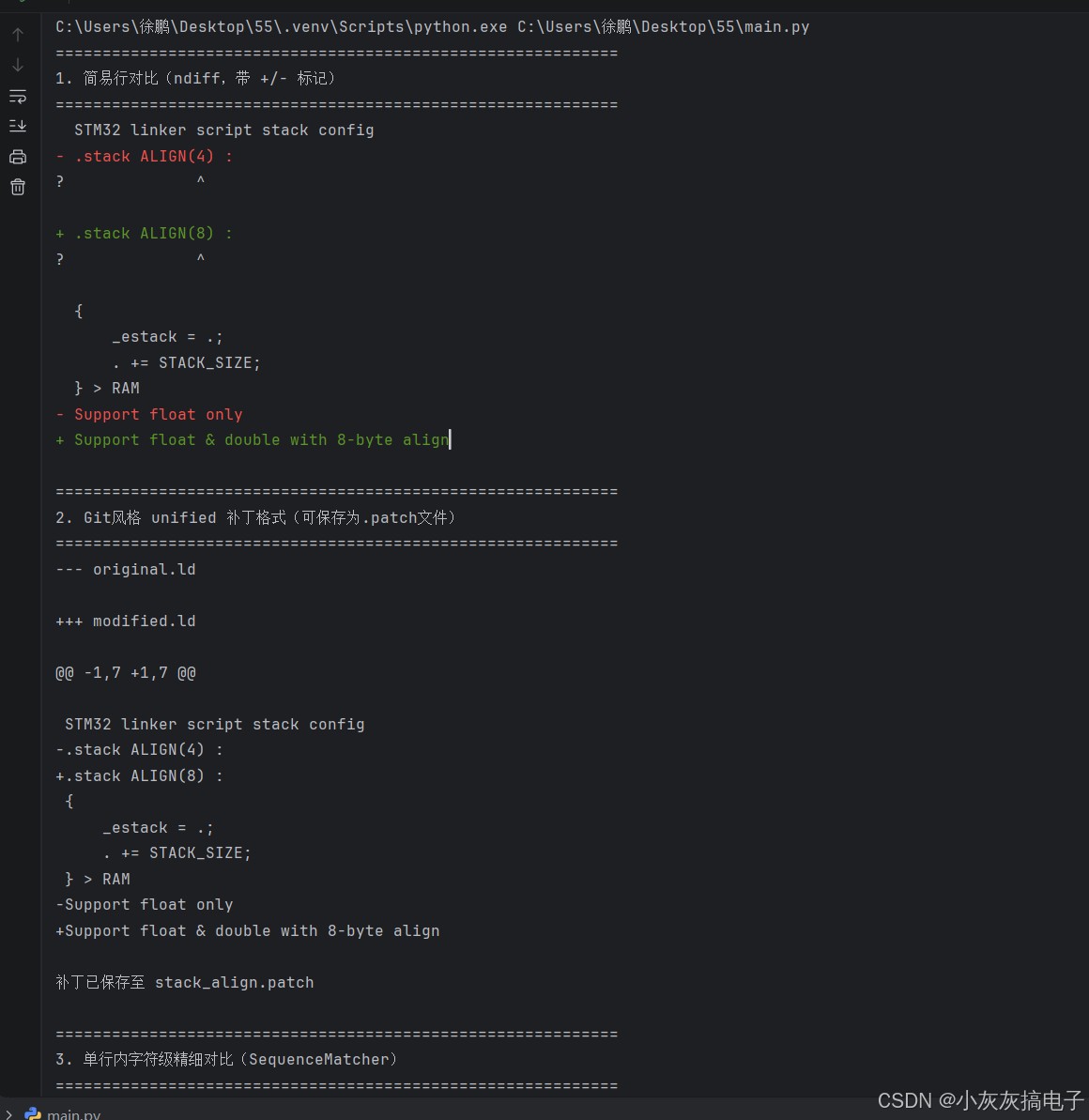
以上就是python difflib库实现文本差异比较与合并实战指南的详细内容,更多关于python difflib文本差异比较的资料请关注代码网其它相关文章!
赞 (0)
您想发表意见!!点此发布评论




发表评论