
Linux系统下从0到1安装PgSQL全过程
116人参与 • 2026-09-20 • MsSqlserver
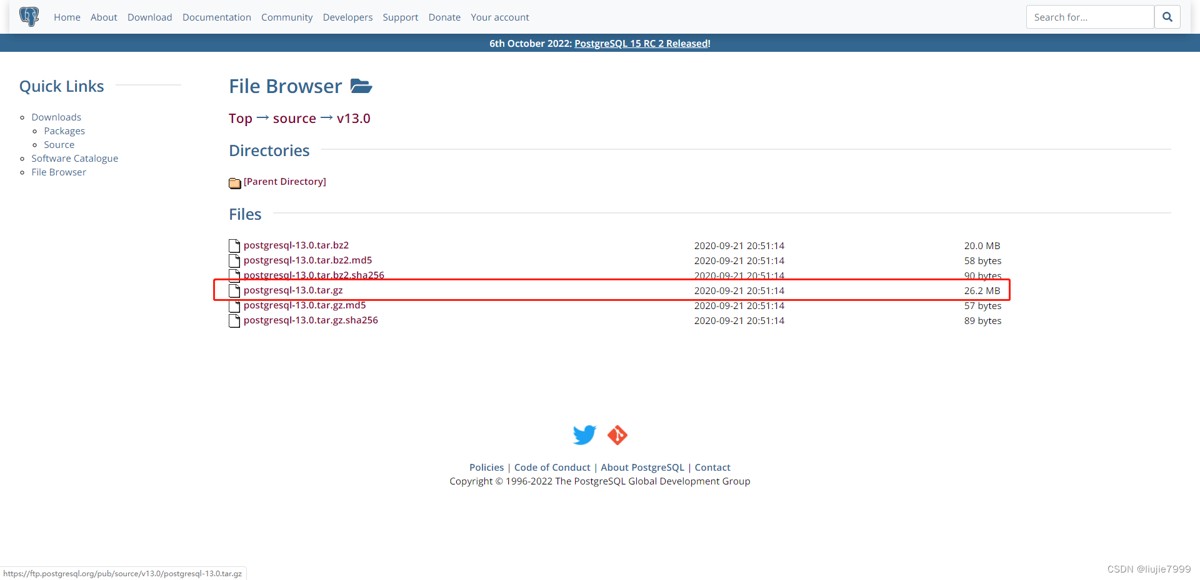
1、下载对应安装包
可在官网下载:http://www.postgresql.org/ftp/source/
选择自己需要的版本就行
2、安装依赖包
在安装pgsql的服务器上安装这些依赖
yum install -y perl-extutils-embed readline-devel zlib-devel pam-devel libxml2-devel libxslt-devel openldap-devel python-devel gcc-c++ openssl-devel cmake
3、安装postgres
1、新建pgsql文件夹,并将pgsql的压缩包移入。
2、解压压缩包
3、进入解压后的文件夹
4、编译postgresql源码
./configure --prefix=/opt/software/pgsql/postgresql
make
make install
至此,已完成postgreql的安装。
进入/pgsql/postgresql目录可以看到安装后的postgresql的文件。
4、创建用户组postgres并创建用户postgres
groupadd postgres
useradd -g postgres postgres
id postgres
5、创建postgresql数据库的数据主目录并修改文件所有者
cd /opt/software/pgsql/postgresql
mkdir data
chown postgres:postgres data
6、配置环境变量
vim /etc/profile.d/my_env.sh	--非root用户前面要加sudo

export pghome=/opt/software/pgsql/postgresql
export pgdata=/opt/software/pgsql/postgresql/data
path=$path:$home/bin:$pghome/bin

source /etc/profile.d/my_env.sh
7、切换用户到postgres并使用initdb初使用化数据库
[root@xxxxx postgres]# su - postgres

[postgres@xxxxx ~]$ initdb
the files belonging to this database system will be owned by user "postgres".
this user must also own the server process.

the database cluster will be initialized with locale "zh_cn.utf-8".
the default database encoding has accordingly been set to "utf8".
initdb: could not find suitable text search configuration for locale "zh_cn.utf-8"
the default text search configuration will be set to "simple".

data page checksums are disabled.

fixing permissions on existing directory /pgsql/postgresql/data ... ok
creating subdirectories ... ok
selecting default max_connections ... 100
selecting default shared_buffers ... 128mb
selecting dynamic shared memory implementation ... posix
creating configuration files ... ok
running bootstrap script ... ok
performing post-bootstrap initialization ... ok
syncing data to disk ... ok

warning: enabling "trust" authentication for local connections
you can change this by editing pg_hba.conf or using the option -a, or
--auth-local and --auth-host, the next time you run initdb.

success. you can now start the database server using:

    pg_ctl -d /pgsql/postgresql/data -l logfile start
/opt/software/pgsql/postgresql/data已经有文件了。
8、配置服务
修改/pgsql/postgresql/data目录下的两个文件。
postgresql.conf 配置postgresql数据库服务器的相应的参数。
pg_hba.conf 配置对数据库的访问权限。
[postgres@xxxxx  data]$ vi postgresql.conf

listen_addresses = '*'                  # what ip address(es) to listen on;
                                        # comma-separated list of addresses;
                                        # defaults to 'localhost'; use '*' for all
                                        # (change requires restart)
#port = 5432                            # (change requires restart)
其中,参数“listen_addresses”表示监听的ip地址,默认是在localhost处监听,也就是127.0.0.1的ip地址上监听,只接受来自本机localhost的连接请求,这会让远程的主机无法登陆这台数据库,如果想从其他的机器上登陆这台数据库,需要把监听地址改为实际网络的地址,一种简单的方法是,将行开头的#去掉,把这个地址改为*,表示在本地的所有地址上监听。
vi pg_hba.conf
找到最下面这一行 ,这样局域网的人才能访问。红色为新添加内容。
#ipv4 local connections:
host    all             all             0.0.0.0/0               trust
host    all             all             127.0.0.1/32            trust
9、设置postgresql开机自启动
cd ../postgresql-11.1/contrib/start-scripts
1)切换为root用户,修改linux文件属性,添加x属性
chmod a+x linux
2 ) 复制linux文件到/etc/init.d目录下,更名为postgresql
cp linux /etc/init.d/postgresql
3)修改/etc/init.d/postgresql文件的两个变量
prefix设置为postgresql的安装路径:/pgsql/postgresql
pgdata设置为postgresql的数据目录路径:/pgsql/postgresql/data
4)设置postgresql服务开机自启动
chkconfig --add postgresql
5 )查看开机自启动服务设置成功。
chkconfig

postgresql         0:关闭    1:关闭    2:启用    3:启用    4:启用    5:启用    6:关闭
6 ) 执行service postgresql start,启动postgresql服务
service postgresql start
7 ) 查看postgresql服务
[root@xxxxx init.d]# ps -ef | grep postgres
psql -u postgres -d postgres --如果能进去则安装成功
总结
以上为个人经验,希望能给大家一个参考,也希望大家多多支持代码网。
赞 (0)
您想发表意见!!点此发布评论



发表评论