
SpringBoot+Calcite实现跨库查询功能的示例代码
3人参与 • 2026-09-21 • Java
1. 简介
什么是calcite
apache calcite 是一个动态数据管理框架。
它包含了典型数据库管理系统(dbms)的许多核心组件,但省略了一些关键功能:不提供数据存储、不实现数据处理算法,也不维护存储元数据的仓库。
calcite 刻意避开了数据存储与处理的业务范畴。正如我们将看到的,这使其成为连接应用程序与一个或多个数据存储位置及数据处理引擎的绝佳中介。同时,它也是构建数据库的完美基础——只需补充数据即可。
calcite应用场景
联邦查询
用一条 sql 同时查多个异构数据源,如下示例:
select u.name, o.amount from mysql.users u join csv.orders o on u.id = o.user_idwhere o.amount > 200
该示例,将从mysql和csv文件中连接查询数据。
支持的数据源:mysql、postgresql、oracle、csv、json、elasticsearch、kafka、hdfs 等。
为自研数据库/计算引擎提供 sql 引擎
避免重复造轮子,快速获得工业级 sql 能力。
被这些顶级项目采用:apache flink:flink sql 的解析与优化器; apache druid:sql 查询接口; splunk:sql 查询功能底层等。
当你有如下需求时,你可以考虑使用calcite:
- 统一查询多个数据源
- 为产品加 sql 能力
- 快速搭建虚拟数据层
本篇文章,我们将基于 mysql 与 csv 的跨数据源联合查询实现。
2.实战案例
引入依赖
<dependency>
  <groupid>org.springframework.boot</groupid>
  <artifactid>spring-boot-starter-jdbc</artifactid>
</dependency>
<dependency>
  <groupid>org.apache.calcite</groupid>
  <artifactid>calcite-core</artifactid>
  <version>1.41.0</version>
  <scope>compile</scope>
</dependency>
<dependency>
  <groupid>org.apache.calcite</groupid>
  <artifactid>calcite-file</artifactid>
  <version>1.41.0</version>
  <scope>compile</scope>
</dependency>
<dependency>
  <groupid>mysql</groupid>
  <artifactid>mysql-connector-java</artifactid>
  <version>8.0.33</version>
</dependency>
mysql数据准备
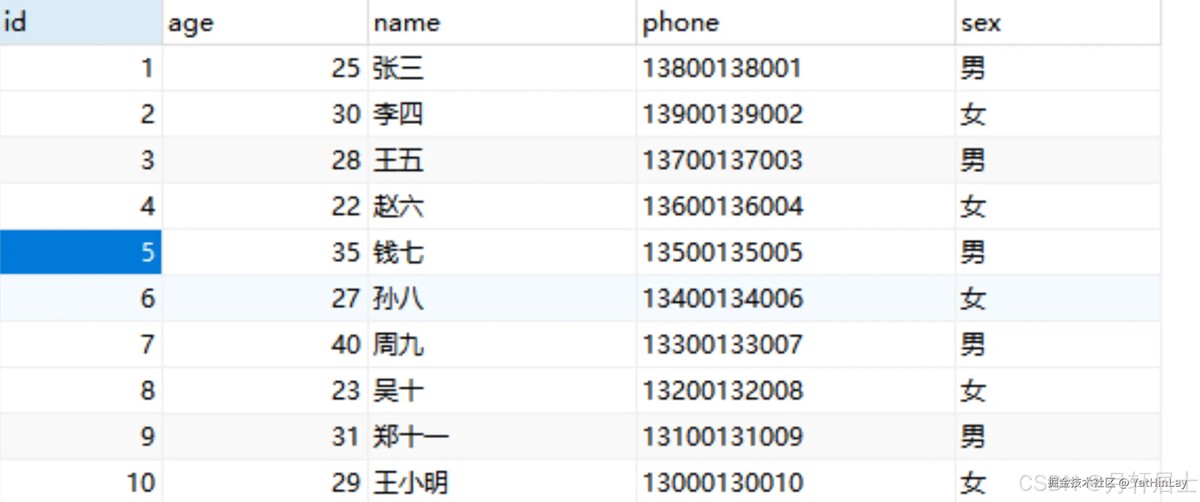
csv文件数据
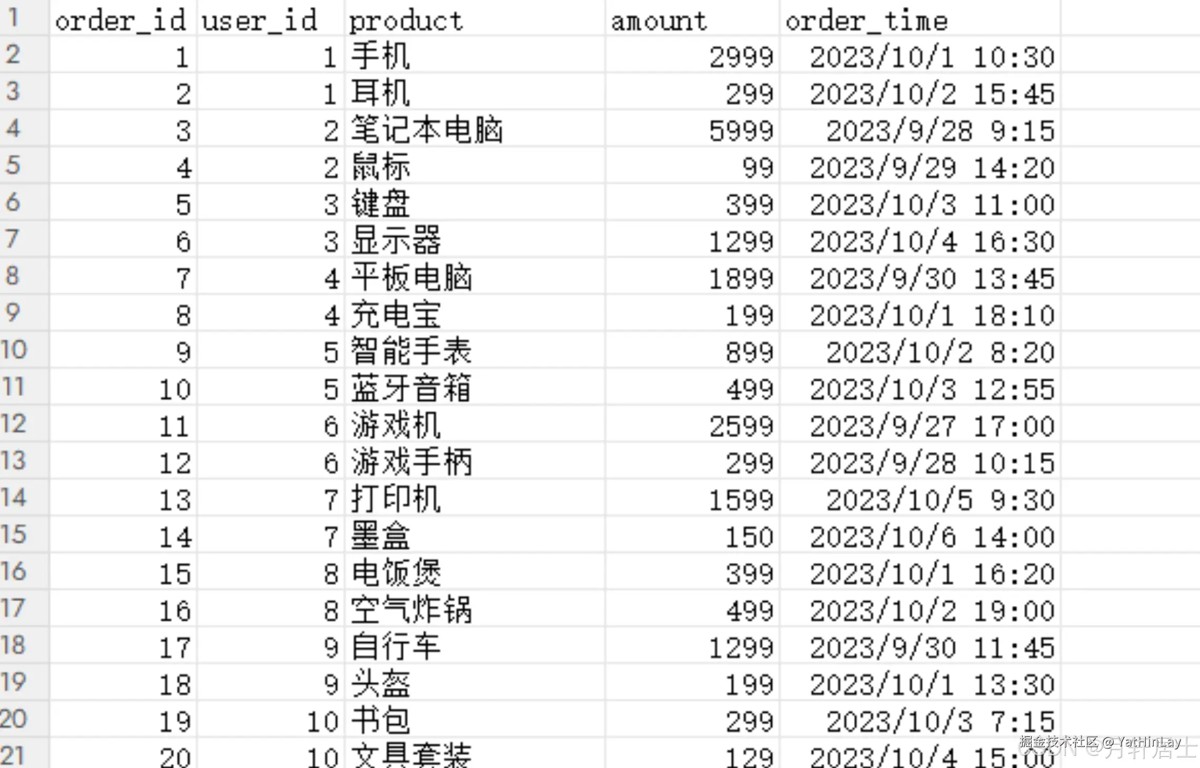
模型配置
{
  "version": "1.0",
  "defaultschema": "users",
  "schemas": [
    {
     "name": "users",
      "type": "custom",
      "factory": "org.apache.calcite.adapter.jdbc.jdbcschema$factory",
      "operand": {
        "jdbcdriver": "com.mysql.cj.jdbc.driver",
        "jdbcurl": "jdbc:mysql://localhost:3306/ddd?servertimezone=gmt%2b8&usessl=false&characterencoding=utf-8",
        "jdbcuser": "root",
        "jdbcpassword": "root"
          }
    },
    {
      "name": "orders",
      "type": "custom",
      "factory": "org.apache.calcite.adapter.file.fileschemafactory",
      "operand": {
        "directory": "f:/datas" // 你csv文件目录,每个文件名将会成为表名
      }
    }
  ]
}
这里我们配置了2个schema,mysql和csv文件。
在准备好上述数据后,我们先使用 calcite 分别对 mysql 和 csv 文件进行查询,以验证数据访问是否正常,最后再将其与 spring boot 结合使用。
基本使用测试
mysql测试
@test
public void testjdbc() throws exception {
  properties info = new properties();
  info.put("lex", "mysql");
  classpathresource resource = new classpathresource("model.json") ;
  info.put("model", resource.getfile().getabsolutepath());
  try (connection connection = drivermanager.getconnection("jdbc:calcite:", info)) {
    statement statement = connection.createstatement();
    resultset rs = statement.executequery("select * from users.o_user");
    while (rs.next()) {
      system.err.println("%s, %s, %s, %s, %s".formatted(rs.getobject("id"),rs.getobject("name"),rs.getobject("age"),rs.getobject("sex"),rs.getobject("phone"))) ;
    }
  }
}
运行结果

csv测试
@test
public void testcsv() throws exception {
  properties info = new properties();
  info.put("lex", "mysql");
  classpathresource resource = new classpathresource("model.json") ;
  info.put("model", resource.getfile().getabsolutepath());
  try (connection connection = drivermanager.getconnection("jdbc:calcite:", info)) {
    statement statement = connection.createstatement();
    resultset rs = statement.executequery("select * from orders.orders");
    while (rs.next()) {
      system.err.println("%s, %s, %s, %s, %s".formatted(rs.getobject("order_id"),rs.getobject("user_id"),rs.getobject("product"),rs.getobject("amount"),rs.getobject("order_time"))) ;
    }
  }
}
运行结果
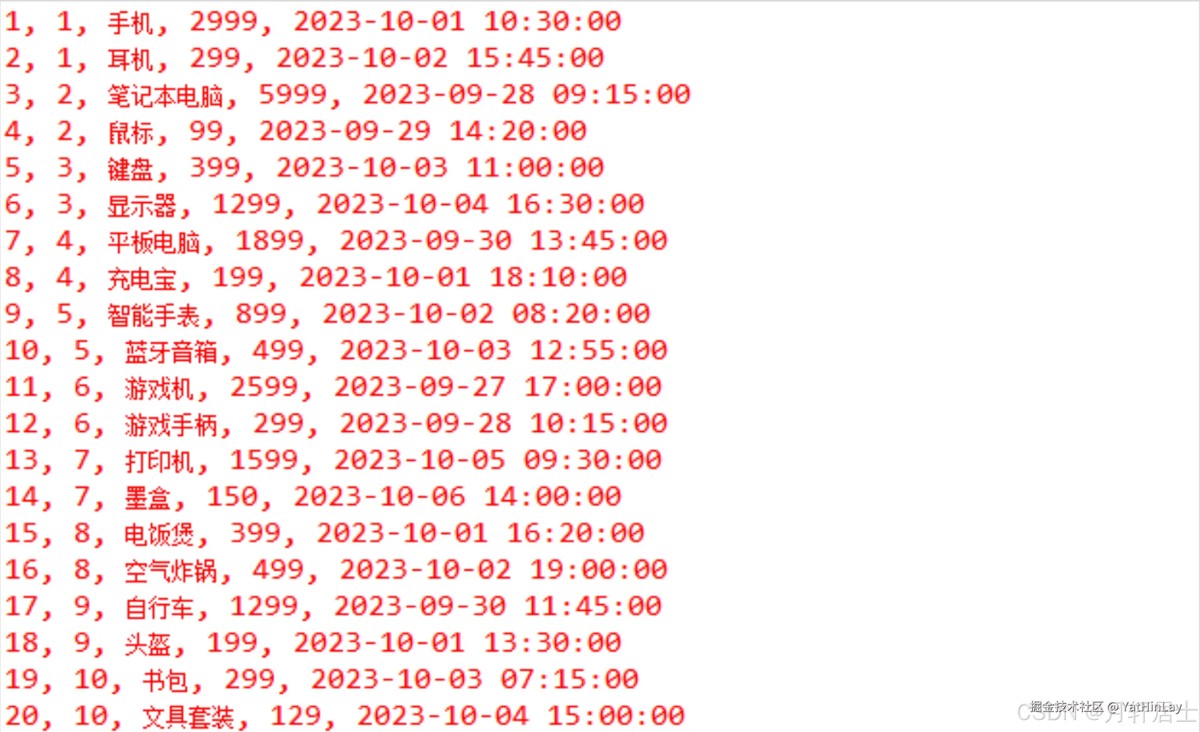
mysql+csv联合查询
首先,自定义数据源
public class calcitedatasource implements datasource {
  private final properties info ;
  public calcitedatasource(string lex, string model) {
    info = new properties();
    info.put("lex", lex);
    classpathresource resource = new classpathresource(model) ;
    try {
      info.put("model", resource.getfile().getabsolutepath());
    } catch (ioexception e) {
      e.printstacktrace();
    }
  }
  @override
  public connection getconnection() throws sqlexception {
    return drivermanager.getconnection("jdbc:calcite:", info) ;
  }
  @override
  public connection getconnection(string username, string password) throws sqlexception {
    return this.getconnection();
  }
}
接下来,配置数据源
@bean(autowirecandidate = false)
datasource calcitedatasource() throws exception {
  return new calcitedatasource("mysql", "model.json") ;
}
最后,通过jdbcclient执行联合查询
@service
public class calciteservice {
  private final jdbcclient jdbcclient ;
  public calciteservice(applicationcontext context) {
    this.jdbcclient = jdbcclient.create(context.getbean("calcitedatasource", datasource.clas)) ;
  }
  public list<map<string, object>> queryuser() {
    list<map<string, object>> result = this.jdbcclient.sql("select * from users.o_user x left join orders.orders y on(x.id = y.user_id) where x.id = 8 and y.amount > 200") .query().listofrows() ;
    return result ;
  }
}
运行结果

以上就是springboot+calcite实现跨库查询功能的示例代码的详细内容,更多关于springboot calcite跨库查询的资料请关注代码网其它相关文章!
赞 (0)
您想发表意见!!点此发布评论





发表评论