
从入门到高效工作流! 开发工具Cursor使用配置及备忘
296人参与 • 2025-06-14 • unity
最近一段时间大模型开发工具cursor是比较火爆的,其提供的一个比较有价值的特性就是其ai辅助功能,其内部集成了若干大模型 提供免费使用期;做大模型开发这个话题应该是绕不过的,就像开发java使用idea;cursor 是一个基于visual studio code(vs code)技术构建的高级代码编辑器,专为提高编程效率并更深度地整合 ai 功能而设计。
由于个人对vscode也是比较陌生,最近切换到这个工具最开始也是很不适应,不过时间长了还好逐步开始适应了新的工具;以下纪录一些平常使用过程中遇到的问题。
调整左侧资源管理器(explorer)的缩进间隔
你可以通过修改设置来调整左侧资源管理器(explorer)中文件和文件夹的缩进间隔。
- 打开 vs code 的设置:
- 使用快捷键 ctrl + , (windows/linux) 或 cmd + , (mac) 或者通过菜单:文件 > 首选项 > 设置
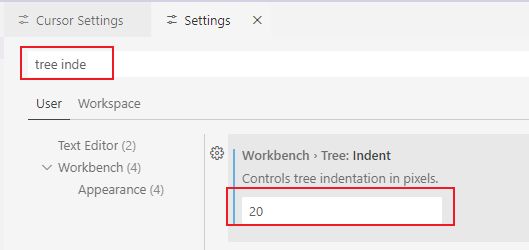
- 在设置中搜索 tree indent
- 你会找到以下两个相关设置:
- workbench > tree: indent - 控制树缩进的像素值(默认是8)
- workbench > tree: render indent guides - 是否显示缩进参考线
- 修改 workbench > tree: indent 的值为你想要的像素数(例如12、16等)
设置界面如下:
修改后的效果,宽度变宽了:
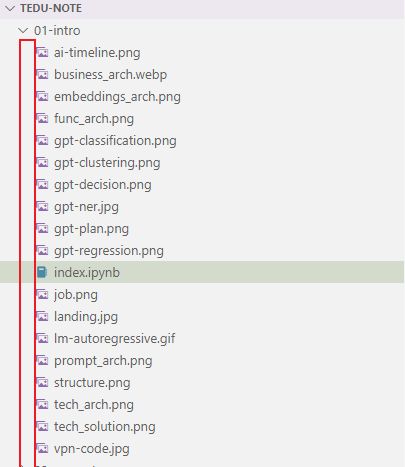
设置cursor
在新的窗口中打开目录
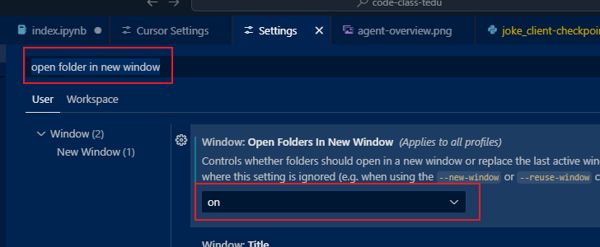
如果在cursor里打开一个目录,cursor会默认关闭当前窗口然后再打开目录;如果希望在新的窗口打开而不影响已打开的窗口,可以在vscode的配置里搜索:open folder in new window
然后选择on
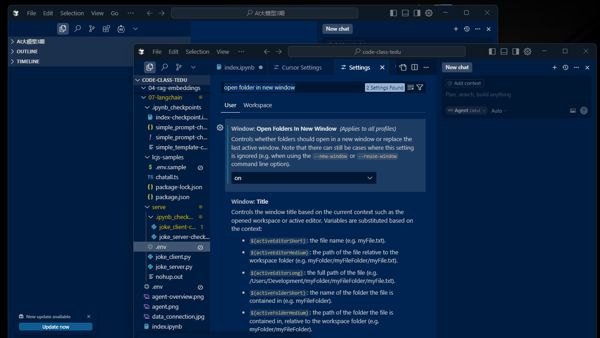
这样就可以两个窗口展示了
设置侧边栏的位置,靠左 或者 靠右
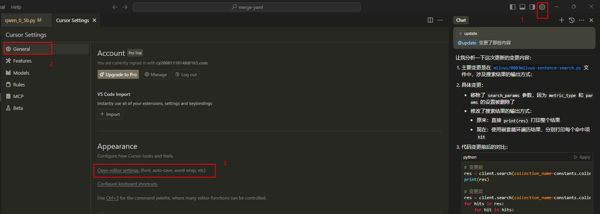
1、点击右上角设置按钮,进入cursor setting面板;选择 general -> appearance -> open editor settings
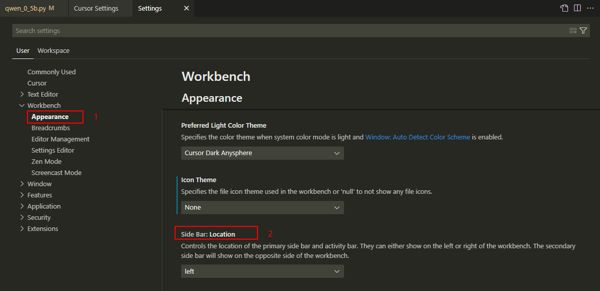
2、点击 appearance -> side bar: location
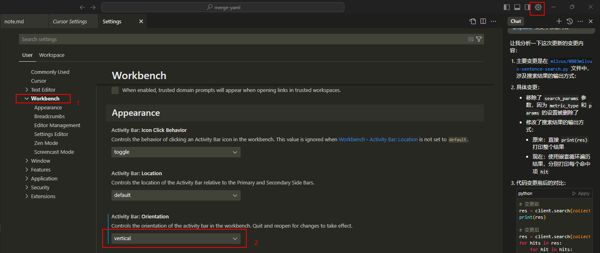
编辑侧边栏是水平的还是vscode竖直风格
在 workbench -> activaty bar z做对应选择
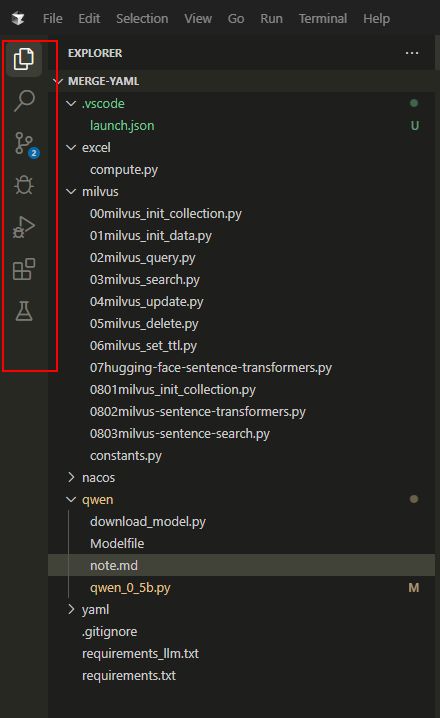
效果:竖直的侧边栏能放更多的图标
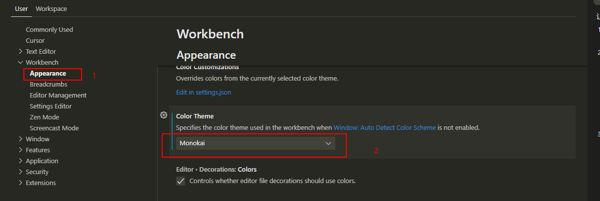
设置主题
1、点击右上角设置按钮,进入cursor setting面板;选择general -> appearance -> open editor settings
2、进入 workbench -> appearance,下拉 color theme即可
设置单机文件在新的页签窗口打开文件
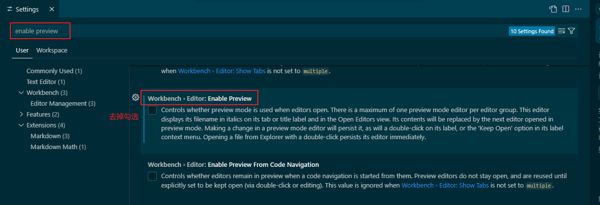
cursor默认单击文件的时候是在原页签创建打开文件,如果想在新的页签窗口打开,可以按照以下设置:
搜索enable preview,去掉 workbench> editor> enable preview 签名的复选即可
解决控制台打印乱码
- ctrl+p 打开 setting.json
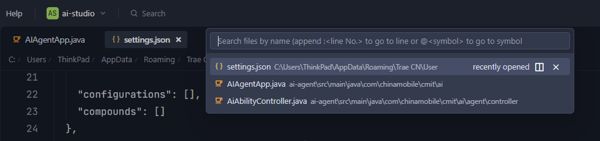
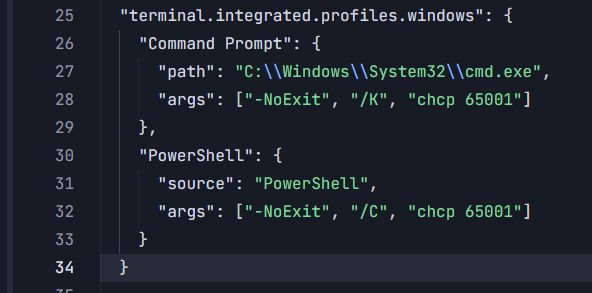
- 添加如下内容:
  "terminal.integrated.profiles.windows": {
    "command prompt": {
      "path": "c:\\windows\\system32\\cmd.exe",
      "args": ["-noexit", "/k", "chcp 65001"]
    },
    "powershell": {
      "source": "powershell",
      "args": ["-noexit", "/c", "chcp 65001"]
    }
  }
打印乱码问题解决
设置java环境
- 使用快捷键ctrl + shift + p(windows/linux)或cmd + shift + p(mac)打开命令面板。在命令面板中,输入并选择“java: configure java runtime”。然后,选择已安装的jdk版本作为当前工作空间的jdk。
这里的下拉选项是工具自动扫描出来的:
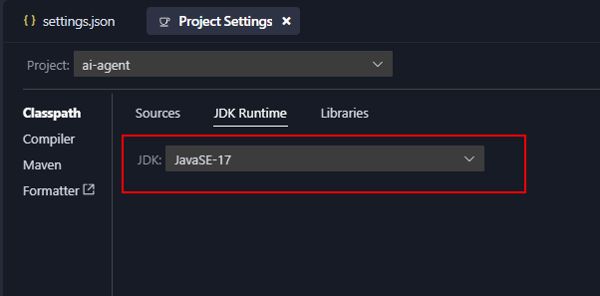
- 另一种方法直接设置java_home: ctrl +p 进入 setting.json编辑,加入java home设置
"java.jdt.ls.java.home":"c:/program files/java/jdk1.8.0_181"
- 设置多个版本的java,这里就需要配置 java.configuration.runtimes 了
"java.configuration.runtimes": [
    {
        "name": "javase-17",
        "path": "c:/program files/java/jdk-17",
        "default": true
    },
    {
        "name": "javase-1.8",
        "path": "c:/program files/java/jdk1.8.0_181"
    }
]
name需要是枚举值,不然会报错,枚举值支持以下

设置滚动时左侧树不粘贴悬浮保留左侧树
默认目录结构会停留,遮盖代码很不方便

在setting.json 里搜索 enable sticky scroll
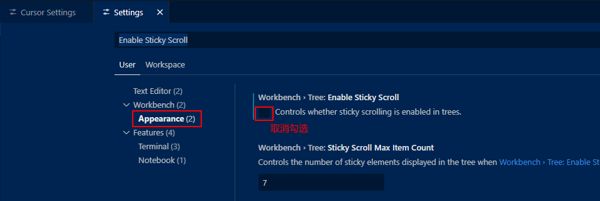
取消勾选后,就不会悬浮遮挡了
或者直接在 settings.json 里添加
"workbench.tree.enablestickyscroll": false,
也可以
配置搜索范围为整个项目,而不限制是打开的文件
vscode在搜索的默认只搜索打开的文件,很不方便;可以通过在settings.json里配置设置为全局搜索
"search.exclude": {
    "system/": true,
    "!/system/**/*.ps*": true
  }
这样就可以在未打开的文件里搜索内容了
完整setting.json
以下json在vscode cursor trae都兼容,包含python代码格式化,java环境配置,maven配置
{
  "workbench.colortheme": "tomorrow night blue",
  "workbench.activitybar.orientation": "vertical",
  "window.openfoldersinnewwindow": "on",
  "editor.rename.enablepreview": false,
  "workbench.editor.enablepreview": false,
  "git.enablesmartcommit": true,
  "editor.fontsize": 16,
  "[python]": {
    "editor.defaultformatter": "ms-python.black-formatter",
    "editor.formatonsave": true
  },
  "editor.stickyscroll.enabled": false,
  "explorer.confirmdraganddrop": false,
  "explorer.confirmdelete": false,
  "maven.settingsfile": "c:/users/thinkpad/.m/settings.xml",
  "maven.executable.path": "e:/apache-maven-3.9.9/bin/mvn.cmd",
  "redhat.telemetry.enabled": false,
  "terminal.integrated.profiles.windows": {
    "command prompt": {
      "path": "c:\\windows\\system32\\cmd.exe",
      "args": [
        "-noexit",
        "/k",
        "chcp 65001"
      ]
    },
    "powershell": {
      "source": "powershell",
      "args": [
        "-noexit",
        "/c",
        "chcp 65001"
      ]
    }
  },
  "gitlens.views.branches.files.layout": "list",
  "gitlens.views.branches.branches.layout": "list",
  "java.jdt.ls.java.home": "c:/program files/java/jdk1.8.0_181",
  "java.configuration.runtimes": [
    {
      "name": "javase-17",
      "path": "c:/program files/java/jdk-17",
      "default": true
    },
    {
      "name": "javase-1.8",
      "path": "c:/program files/java/jdk1.8.0_181"
    }
  ],
  "git.autofetch": true,
  "workbench.preferreddarkcolortheme": "tomorrow night blue",
  "search.exclude": {
    "system/": true,
    "!/system/**/*.ps*": true
  },
  "workbench.tree.enablestickyscroll": false,
  "workbench.settings.applytoallprofiles": []
}
赞 (0)
您想发表意见!!点此发布评论




发表评论