
MongoDB集合重命名的完整指南
93人参与 • 2025-11-21 • mongodb
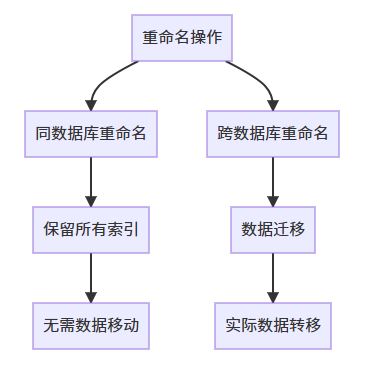
1. 集合重命名架构总览
2. renamecollection命令详解
2.1 命令语法结构
db.admincommand({
  renamecollection: "<source_db>.<source_collection>",
  to: "<target_db>.<target_collection>",
  droptarget: <boolean>,  // 可选
  staytemp: <boolean>     // 可选(4.4+)
})
2.2 参数说明表格
| 参数 | 类型 | 必填 | 描述 | 默认值 |
|---|---|---|---|---|
| renamecollection | string | 是 | 源集合完全限定名 | - |
| to | string | 是 | 目标集合完全限定名 | - |
| droptarget | boolean | 否 | 是否覆盖目标集合 | false |
| staytemp | boolean | 否 | 是否保留临时状态 | false |
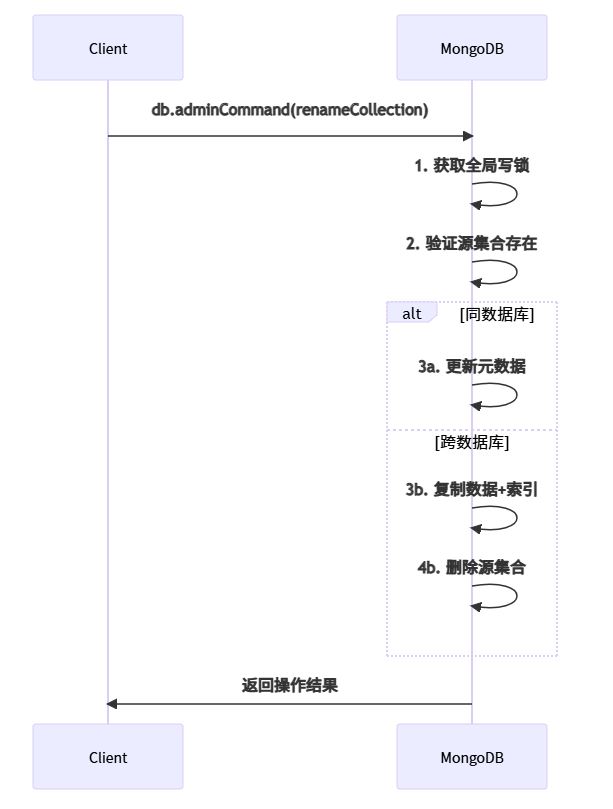
3. 重命名操作流程图
4. 不同场景下的重命名操作
4.1 同数据库重命名
// 基本语法
db.admincommand({
  renamecollection: "test.products_old",
  to: "test.products_new"
})

// 验证结果
use test
show collections
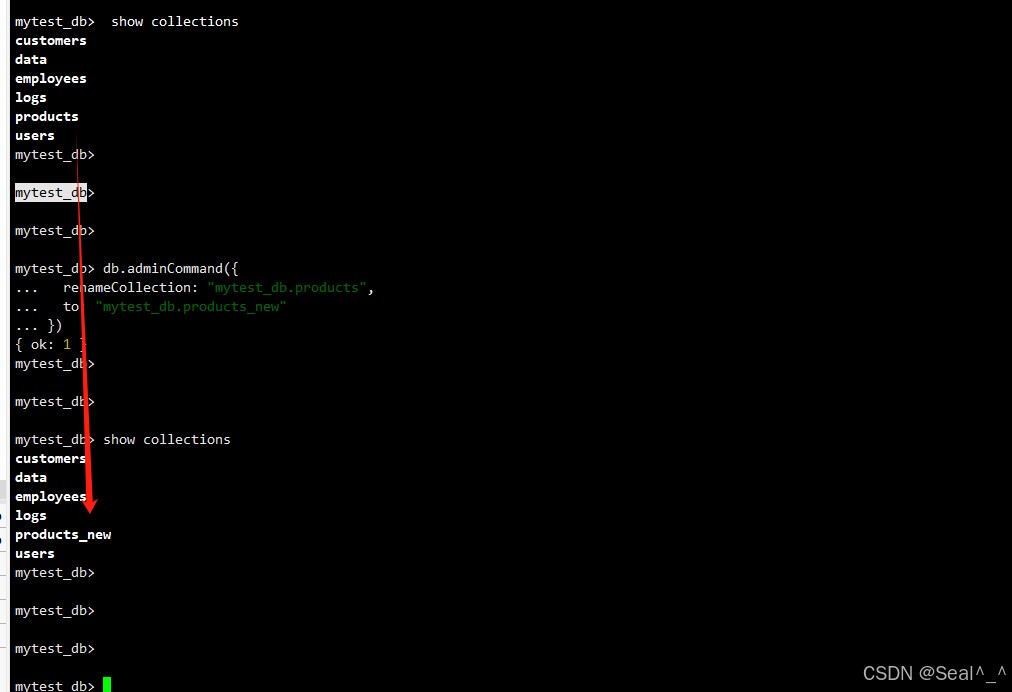
例子:
db.admincommand({
  renamecollection: "mytest_db.products",
  to: "mytest_db.products_new"
})

// 验证结果
show collections
4.2 跨数据库重命名
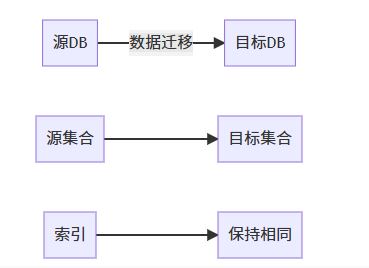
// 跨数据库重命名
db.admincommand({
  renamecollection: "dev.users",
  to: "prod.customers"
})

// 强制覆盖目标集合
db.admincommand({
  renamecollection: "dev.logs",
  to: "prod.app_logs",
  droptarget: true
})
5. 重命名操作特性
5.1 保留的集合属性
| 属性 | 是否保留 | 备注 |
|---|---|---|
| 文档数据 | 是 | 全部迁移 |
| 索引 | 是 | 包括自定义索引 |
| 分片配置 | 否 | 需重新配置 |
| 视图依赖 | 否 | 需手动更新 |
| 验证规则 | 是 | 保持原样 |
5.2 性能影响对比
| 操作类型 | 锁级别 | 资源消耗 | 耗时 |
|---|---|---|---|
| 同db重命名 | 全局写锁 | 低 | 快 |
| 跨db重命名 | 全局写锁 | 高(数据复制) | 慢 |
6. 权限与安全配置
6.1 所需权限矩阵
| 操作 | 源db权限 | 目标db权限 |
|---|---|---|
| 同db重命名 | renamecollection | - |
| 跨db重命名 | readwrite | dbadmin |
6.2 创建专用角色
use admin
db.createrole({
  role: "collectionadmin",
  privileges: [
    {
      resource: { db: "", collection: "" },
      actions: ["renamecollection"]
    }
  ],
  roles: []
})
7. 高级应用场景
7.1 临时集合处理
// 创建临时集合
db.temp_data.insertmany([...])

// 重命名并保留临时状态(4.4+)
db.admincommand({
  renamecollection: "test.temp_data",
  to: "test.final_data",
  staytemp: true
})
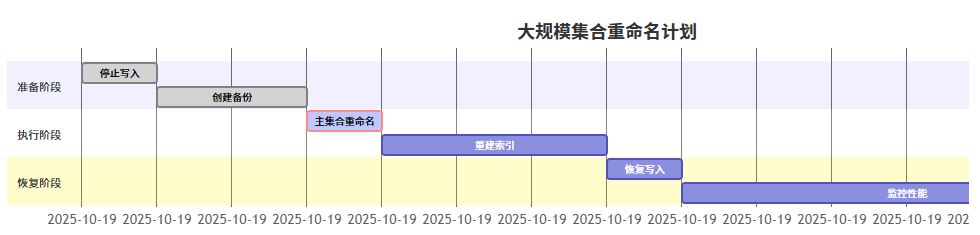
7.2 大规模集合重命名策略
8. 故障排查与恢复
8.1 常见错误代码
| 错误代码 | 原因 | 解决方案 |
|---|---|---|
| 26 | 命名空间不存在 | 检查源集合名 |
| 48 | 目标已存在 | 使用droptarget或先删除 |
| 73 | 无效名称 | 检查命名规范 |
| 13 | 权限不足 | 提升用户权限 |
8.2 操作回滚方案
// 1. 检查oplog获取操作时间点
use local
db.oplog.rs.find({op: "c", ns: "admin.$cmd"}).sort({$natural: -1}).limit(1)

// 2. 执行反向重命名
db.admincommand({
  renamecollection: "test.new_name",
  to: "test.original_name",
  droptarget: true
})
9. 最佳实践建议
生产环境操作清单:
- 业务低峰期执行
- 提前备份数据
- 通知相关团队
- 准备回滚方案
命名规范建议:
// 好的命名
db.admincommand({renamecollection: "analytics.user_logs", to: "analytics.user_events"})

// 不好的命名
db.admincommand({renamecollection: "db1.col1", to: "db2.1234"})
监控指标:
# 监控集合重命名操作
mongotop -n 10
mongostat --discover -n 5
10. 替代方案比较
| 方案 | 优点 | 缺点 | 适用场景 |
|---|---|---|---|
| renamecollection | 原子操作,保留索引 | 需要停机 | 中小集合 |
| mongodump+mongorestore | 可选择性迁移 | 耗时较长 | 超大集合 |
| 应用层双写 | 无需停机 | 实现复杂 | 关键业务集合 |
通过本文的全面介绍,您应该已经掌握了mongodb集合重命名的所有关键知识和实践技巧。请记住在生产环境执行重命名操作前,务必进行充分测试并制定完善的回滚方案。
以上就是mongodb集合重命名完全指南:从基础到高级实践的详细内容,更多关于mongodb集合重命名的资料请关注代码网其它相关文章!
赞 (0)
您想发表意见!!点此发布评论




发表评论