26人参与 • 2026-01-12 • MsSqlserver
这是一份详细的 postgresql 数据库使用指南,涵盖核心概念、操作、管理和优化实践。
postgresql 是一个功能强大、开源的对象关系型数据库管理系统 (ordbms)。它以其高度的 sql 标准兼容性、强大的功能集(如 json 支持、地理空间数据处理、全文搜索)、可扩展性(通过扩展)以及可靠性(acid 事务支持)而闻名。
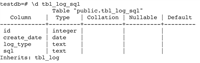
sudo apt-get update && sudo apt-get install postgresql postgresql-contribsudo yum install postgresql-server postgresql-contribbrew install postgresqlsudo postgresql-setup initdbinitdb -d /usr/local/var/postgres (路径可能不同)sudo systemctl start postgresqlbrew services start postgresqlpg_ctl 命令。postgres 的超级用户。psql -u username -d dbname -h hostname -p port-u: 用户名 (如 postgres)-d: 数据库名 (默认 postgres)-h: 主机 (默认 localhost)-p: 端口 (默认 5432)psql 内:\q: 退出\l: 列出所有数据库\c dbname: 切换到数据库 dbname\dt: 列出当前数据库的所有表\d tablename: 查看表 tablename 的结构\?: 查看帮助\e: 打开编辑器编辑当前查询\i filename: 执行 sql 脚本文件 filename\timing: 切换命令执行时间显示create database mydatabase; -- 指定所有者 create database mydatabase owner myuser; -- 指定编码 (推荐 utf8) create database mydatabase encoding 'utf8';
在 postgresql 中,"角色"(role)可以代表用户(user)或用户组(group)。
-- 创建登录角色 (用户)
create role myuser with login password 'mypassword';
-- 创建超级用户
create role adminuser with login password 'adminpass' superuser;
-- 修改密码
alter role myuser with password 'newpassword';
create table employees (
    id serial primary key, -- serial 通常用于自动递增主键
    first_name varchar(50) not null,
    last_name varchar(50) not null,
    email varchar(100) unique,
    hire_date date not null,
    salary numeric(10, 2) check (salary > 0),
    department_id integer references departments(id) -- 外键约束
);
常见数据类型:
integer, smallint, bigintnumeric(precision, scale), decimal(precision, scale) - 精确数值real, double precision - 浮点数varchar(n), char(n), textbooleandate, time, timestamp, intervaljson, jsonb (二进制 json, 更高效)uuidarraygeometry (postgis 扩展)插入数据 (create):
insert into employees (first_name, last_name, email, hire_date, salary, department_id)
values ('john', 'doe', 'john.doe@example.com', '2023-01-15', 60000.00, 1);
-- 插入多条
insert into employees (...) values (...), (...), (...);
查询数据 (read):
-- 基本查询
select * from employees;
-- 选择特定列
select first_name, last_name, salary from employees;
-- 条件过滤 (where)
select * from employees where salary > 50000;
select * from employees where hire_date between '2022-01-01' and '2023-12-31';
select * from employees where last_name like 'sm%'; -- 模糊匹配
-- 排序 (order by)
select * from employees order by salary desc;
-- 限制结果集 (limit, offset)
select * from employees order by hire_date desc limit 10 offset 20; -- 分页
-- 聚合函数 (count, sum, avg, min, max)
select count(*) from employees;
select department_id, avg(salary) as avg_salary from employees group by department_id;
select department_id, avg(salary) from employees group by department_id having avg(salary) > 50000; -- having 过滤分组
-- 连接查询 (join)
select e.first_name, e.last_name, d.name as department_name
from employees e
inner join departments d on e.department_id = d.id;
-- 子查询
select * from employees where salary > (select avg(salary) from employees);
更新数据 (update):
update employees set salary = salary * 1.05 where department_id = 3; -- 给部门3的员工涨薪5%
update employees set email = 'new.email@example.com' where id = 42;
删除数据 (delete):
delete from employees where id = 100; -- 删除特定行
delete from employees; -- 删除所有行 (危险!通常用 truncate 更快)
truncate table employees; -- 快速清空表,重置序列 (如果有),但无法触发 delete 触发器
truncate table employees restart identity; -- 同时重置关联的序列
索引是加速查询的关键。
create index idx_employees_last_name on employees (last_name);
create index idx_employees_department_salary on employees (department_id, salary); -- 复合索引
-- 唯一索引 (通常由 unique 约束自动创建)
create unique index idx_employees_email on employees (email);
@>, <@, &&)的数据类型,如数组、jsonb、全文搜索。\d tablename 或 select * from pg_indexes where tablename = 'employees';reindex index idx_name; 或 reindex table table_name; 或 reindex database db_name;postgresql 使用 mvcc (多版本并发控制) 来管理并发访问。
begin; -- 或 start transaction;
-- 执行一系列 sql 语句
update accounts set balance = balance - 100.00 where id = 1;
update accounts set balance = balance + 100.00 where id = 2;
commit; -- 提交事务
-- 如果出错
rollback; -- 回滚事务
read committed (默认)repeatable readserializableset transaction isolation level ...; (在 begin 之后)视图是基于一个或多个表的查询结果的虚拟表。
-- 创建视图
create view employee_summary as
select e.id, e.first_name, e.last_name, d.name as department, e.salary
from employees e
join departments d on e.department_id = d.id;
-- 查询视图
select * from employee_summary where department = 'engineering';
-- 更新视图 (有限制条件,需满足特定规则)
create or replace view ... -- 修改视图定义
drop view employee_summary; -- 删除视图
postgresql 支持多种过程语言,最常用的是 pl/pgsql。
-- 简单函数示例
create or replace function get_employee_count(dept_id integer)
returns integer as $$
declare
    emp_count integer;
begin
    select count(*) into emp_count
    from employees
    where department_id = dept_id;
    return emp_count;
end;
$$ language plpgsql;
-- 调用函数
select get_employee_count(1);触发器在特定事件(insert, update, delete)发生时自动执行一个函数。
-- 创建触发器函数 (记录员工薪资变更)
create or replace function log_salary_change()
returns trigger as $$
begin
    if new.salary <> old.salary then
        insert into salary_history (employee_id, old_salary, new_salary, change_time)
        values (old.id, old.salary, new.salary, now());
    end if;
    return new;
end;
$$ language plpgsql;
-- 创建触发器
create trigger track_salary_change
after update of salary on employees -- 仅当 salary 列更新时触发
for each row
execute function log_salary_change();postgresql 的功能可以通过扩展来增强。
select * from pg_available_extensions;create extension extension_name; (需要超级用户权限)\dx 或 select * from pg_extension;主要配置文件,控制数据库行为(内存、连接、日志、复制等)。位置通常在数据目录下。
listen_addresses: 监听地址 ('*' 表示所有 ip)。port: 监听端口 (默认 5432)。max_connections: 最大并发连接数。shared_buffers: 共享内存缓冲区大小(通常设为系统内存的 25%)。work_mem: 每个操作(排序、哈希)可用的内存。maintenance_work_mem: vacuum, create index 等维护操作使用的内存。wal_level: 预写日志级别(影响复制和备份)。fsync: 是否确保数据写入磁盘(通常 on)。postgresql.conf。alter system set parameter_name = 'value'; (需要 superuser 权限,修改 postgresql.auto.conf)。select pg_reload_conf(); (无需重启) 或重启 postgresql 服务。grant select, insert, update on table employees to myuser; -- 授予表权限 grant all privileges on database mydatabase to adminuser; -- 授予数据库所有权限 grant usage on schema public to myuser; -- 授予模式使用权限 (通常是必要的)
revoke update on table employees from myuser;
grant role_name to user_name; -- 将用户加入角色组
revoke role_name from user_name;
# 备份单个数据库
pg_dump -u username -d dbname -f c -f backup_file.dump # 自定义格式 (推荐,支持并行恢复)
pg_dump -u username -d dbname -f p -f backup_file.sql # 纯 sql 格式
# 备份所有数据库 (包括全局对象)
pg_dumpall -u username -f alldbs.sql
# 恢复逻辑备份 (自定义格式)
pg_restore -u username -d newdbname -c backup_file.dump # -c 表示先创建数据库
# 恢复 sql 备份
psql -u username -d dbname -f backup_file.sql
explain 分析查询计划: 这是调优的基础。
explain select * from employees where last_name = 'smith'; -- 显示计划
explain analyze select ...; -- 实际执行并显示计划和实际耗时
analyze table_name; 或 vacuum analyze table_name;。自动 autovacuum 进程通常会处理。shared_buffers, work_mem, effective_cache_size, random_page_cost, maintenance_work_mem。pg_stat_statements 扩展: 识别高频、高消耗的 sql 语句。pg_top, vmstat, iostat, top 等。vacuum: 清理死元组(由 mvcc 产生),回收空间,更新可见性信息。
vacuum table_name; (不阻塞读写)vacuum full table_name; (重写表,阻塞,需要更多空间,慎用)autovacuum_vacuum_scale_factor, autovacuum_vacuum_threshold)。监控 pg_stat_all_tables 的 n_dead_tup。reindex: 重建索引以消除碎片。定期或在性能下降时进行。log_destination, logging_collector, log_filename, log_rotation_size, log_rotation_age。分析日志 (pg_log) 以排查问题。pg_stat_* 视图 (pg_stat_database, pg_stat_user_tables, pg_stat_user_indexes), pg_statio_* 视图。host database user address auth-method [auth-options]trust (不安全), md5, scram-sha-256 (推荐), peer (本地), cert (ssl 证书)。alter role ... password ... 设置强密码。考虑密码有效期(需额外配置)。postgresql.conf: ssl = on, 设置 ssl_cert_file, ssl_key_file。pg_hba.conf: 使用 hostssl 条目强制 ssl 连接。create policy employee_policy on employees for select to sales_staff using (department_id = (select department_id from user_departments where username = current_user)); alter table employees enable row level security;
postgresql 支持多种复制方案以实现高可用性和读写分离。
pg_rewind (修复分歧的备库)。concat(), substring(), trim(), upper(), lower(), length(), position()。now(), current_date, current_time, extract(field from timestamp), date_trunc('unit', timestamp), age(timestamp)。abs(), round(), ceil(), floor(), sqrt(), power(), random()。count(), sum(), avg(), min(), max(), array_agg(), string_agg()。jsonb_array_elements(), jsonb_extract_path_text(), jsonb_set(), ->, ->>。这份指南提供了 postgresql 的全面概览和核心实践。请务必查阅官方文档以获取最准确和最新的信息,并根据您的具体需求和应用场景进行深入学习和配置调整。
到此这篇关于postgresql数据库全攻略:从入门到精通的文章就介绍到这了,更多相关postgresql从入门到精通内容请搜索代码网以前的文章或继续浏览下面的相关文章希望大家以后多多支持代码网!
您想发表意见!!点此发布评论
版权声明:本文内容由互联网用户贡献,该文观点仅代表作者本人。本站仅提供信息存储服务,不拥有所有权,不承担相关法律责任。 如发现本站有涉嫌抄袭侵权/违法违规的内容, 请发送邮件至 2386932994@qq.com 举报,一经查实将立刻删除。






发表评论