
利用EasyPOI实现多sheet和列数的动态生成
201人参与 • 2025-03-08 • Java
一、背景
公司有个报表需求是根据指定日期范围导出指定数据,并且要根据不同逻辑生成两个sheet,这个日期影响的是列数而不是行数,即行的数量和列的数量都是动态变化的,根据用户的选择动态生成的,这个问题花了不少时间才解决的,这边记下笔记。
二、效果图
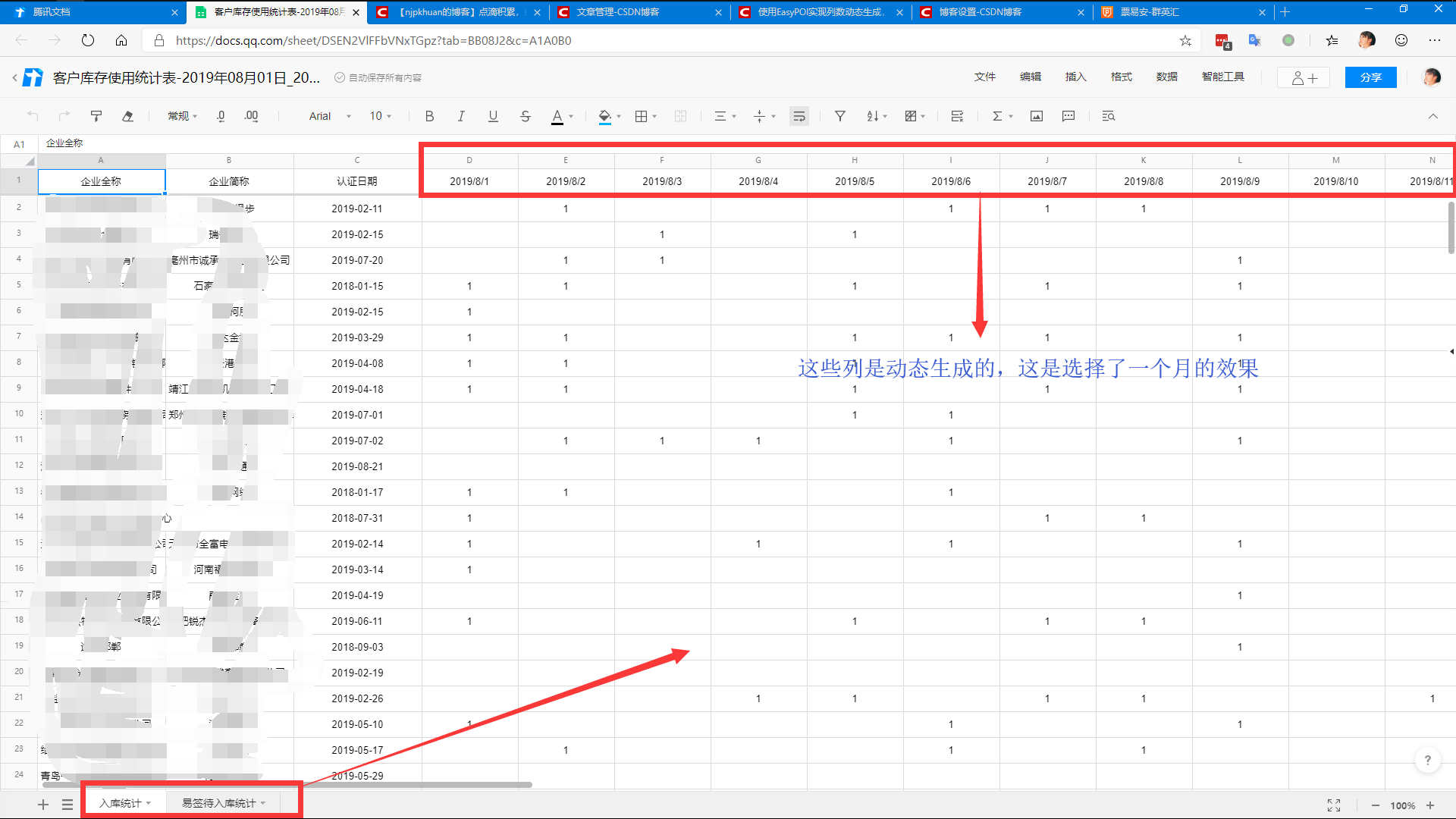
动态生成30个列,两张sheet
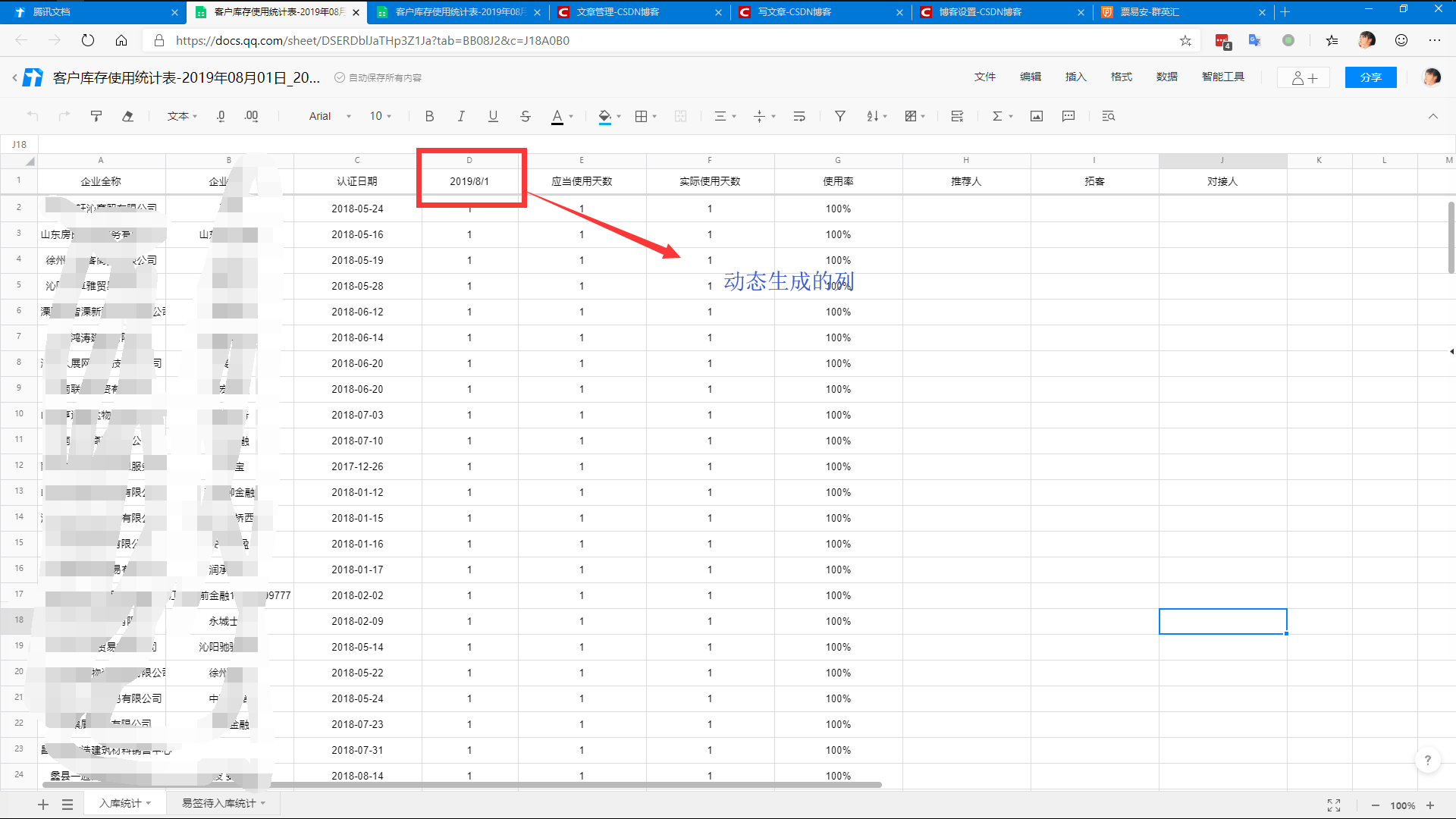
动态生成1个列,两张sheet
三 、准备
我们公司使用的版本是3.2.0,我们项目没有引入所有模块,只用到了base和annotation
 <dependency>
	<groupid>cn.afterturn</groupid>
	<artifactid>easypoi-base</artifactid>
	<version>3.2.0</version>
	<exclusions>
		<exclusion>
			<groupid>org.slf4j</groupid>
			<artifactid>slf4j-api</artifactid>
		</exclusion>
		<exclusion>
			<groupid>org.apache.commons</groupid>
			<artifactid>commons-lang3</artifactid>
		</exclusion>
	</exclusions>
</dependency>
	<dependency>
		<groupid>cn.afterturn</groupid>
		<artifactid>easypoi-annotation</artifactid>
	<version>3.2.0</version>
</dependency>
四、详细步骤
定义表格样式
    /**
     * 定义表格样式
     *
     * @param start 查询起始日期
     * @param end   查询结束日期
     * @return java.util.list<cn.afterturn.easypoi.excel.entity.params.excelexportentity>
     * @author huan
     * @date 2019/6/21
     * @since 2.8.2
     */
    private list<excelexportentity> setexportexcelstyle(datetime start, datetime end) {
        //定义表格列名,该集合存放的就是表格的列明,每个对象就是表格中的一列
        list<excelexportentity> modellist = new arraylist<excelexportentity>();
        //该对象就是定义列属性的对象
        excelexportentity excelentity = null;

        //定义第一个列
        excelentity = new excelexportentity("企业全称", "companyname");
        excelentity.setwidth(20);
        excelentity.setheight(10);
        modellist.add(excelentity);

        //定义第二个列
        excelentity = new excelexportentity("企业简称", "companyshortname");
        excelentity.setwidth(20);
        excelentity.setheight(10);
        modellist.add(excelentity);

        //定义第三个列,这里指定了日期显示格式
        excelentity = new excelexportentity("认证日期", "opendate");
        excelentity.setwidth(20);
        excelentity.setheight(10);
        excelentity.setformat("yyyy-mm-dd");
        modellist.add(excelentity);

        //定义第四个列,这边就是动态生成的,跟用用户选择的日期范围,动态生成列的数量
        excelentity = new excelexportentity(null, "recorddate");
        //设置一个集合,存放动态生成的列
        list<excelexportentity> modellistchild = new arraylist<excelexportentity>();
        start = dateutils.getdatezerotime(start);
        while (start.isbefore(end)) {
            string date = start.tostring("yyyy-mm-dd");
            modellistchild.add(new excelexportentity(date, date, 15));
            start = start.plusdays(1);
        }
        //日期按从小到大顺序排序,这里用了最简单的冒泡排序
        for (int i = 0; i < modellistchild.size(); i++) {
            for (int j = 0; j < modellistchild.size(); j++) {
                string e1 = modellistchild.get(i).getkey().tostring();
                string e2 = modellistchild.get(j).getkey().tostring();
                if (e1.compareto(e2) < 0) {
                    excelexportentity x1 = modellistchild.get(i);
                    excelexportentity x2 = modellistchild.get(j);
                    modellistchild.set(j, x1);
                    modellistchild.set(i, x2);
                }
            }
        }
        //将定义好的字列放到父列中
        excelentity.setlist(modellistchild);
        modellist.add(excelentity);

        //定义第五个列
        excelentity = new excelexportentity("应当使用天数", "shoulduseday");
        excelentity.setwidth(20);
        excelentity.setheight(10);
        modellist.add(excelentity);

        //定义第六个列
        excelentity = new excelexportentity("实际使用天数", "actualuseday");
        excelentity.setwidth(20);
        excelentity.setheight(10);
        modellist.add(excelentity);

        //定义第七个列
        excelentity = new excelexportentity("使用率", "rate");
        excelentity.setwidth(20);
        excelentity.setheight(10);
        modellist.add(excelentity);

        //定义第八个列
        excelentity = new excelexportentity("推荐人", "commandman");
        excelentity.setwidth(20);
        excelentity.setheight(10);
        modellist.add(excelentity);

        //定义第九个列
        excelentity = new excelexportentity("拓客", "tk");
        excelentity.setwidth(20);
        excelentity.setheight(10);
        modellist.add(excelentity);

        //定义第十个列
        excelentity = new excelexportentity("对接人", "connector");
        excelentity.setwidth(20);
        excelentity.setheight(10);
        modellist.add(excelentity);
        return modellist;
    }
定义表格数据
private list<map<string, object>> getdata(analysestockquery analysestockquery, boolean type) {
        //获取数据源
        arraylist<analysestockexportdto> dtolist = listdetaildatawithnum(analysestockquery, type);

        list<map<string, object>> datalist = new arraylist<>();

        //存储没一行中的日期数据
        list<map<string, object>> datalistchild = null;
        //存储表格中的每一行数据
        map<string, object> mapparent = null;

        //数据排序
        dtolist.sort(new exportcomparator());

        //定义表格数据
        for (analysestockexportdto dto : dtolist) {
            mapparent = new hashmap(7);

 			//这边只要和定义表格样式的时候 名称一致就行 我这边因为有三个字段不需要我这边后台生成,所以就没有设置默认值了
            mapparent.put("companyname", dto.getcompanyname());
            mapparent.put("companyshortname", dto.getcompanyshortname());
            mapparent.put("opendate", dto.getopendate());
            mapparent.put("shoulduseday", dto.getshoulduseday());
            mapparent.put("actualuseday", dto.getactualuseday());
            mapparent.put("rate", dto.getrate());
            map<string, object> map = dto.getdatelist();
            datalistchild = new arraylist<>();
            datalistchild.add(map);
            mapparent.put("recorddate", datalistchild);

            datalist.add(mapparent);
        }
        return datalist;
    }
主体方法
	/**
     * 报表导出
     *
     * @param analysestockquery analysestockquery
     * @param response          response
     * @return javax.servlet.http.httpservletresponse
     * @author huan
     * @date 2019/6/21
     * @since 2.8.2
     */
    public httpservletresponse exportstock(analysestockquery analysestockquery, httpservletresponse response) {
        try {
            //设置默认查询日期
            analysestockquery = setdefaultquerydate(analysestockquery);

            //参数校验
            checklistdetaildataparam(analysestockquery);

            //日期格式化
            datetime start = new datetime().withdate(new localdate(analysestockquery.getquerystartdate()));
            datetime end = new datetime().withdate(new localdate(analysestockquery.getquerylastdate()));

            //定义表格样式
            list<excelexportentity> modellist = setexportexcelstyle(start, end);

            //定义表格名称
            string filename = urlencoder.encode("客户库存使用统计表-" + start.tostring("yyyy年mm月dd日") + "~" + end.tostring("yyyy年mm月dd日"), "utf-8");

            // sheet1样式
            exportparams sheet1exportparams = new exportparams();
            // 设置sheet得名称
            sheet1exportparams.setsheetname("入库统计");
            // 创建sheet1使用得map
            map<string, object> sheet1exportmap = new hashmap<>();
            // title的参数为exportparams类型,目前仅仅在exportparams中设置了sheetname
            sheet1exportmap.put("title", sheet1exportparams);
            //sheet1样式
            sheet1exportmap.put("entitylist", modellist);
            //sheet1中要填充得数据,true表示查询入库数据,false表示查询易签待入库数据
            sheet1exportmap.put("data", getdata(analysestockquery, true));

            //sheet2设置
            exportparams sheet2exportparams = new exportparams();
            sheet2exportparams.setsheetname("易签待入库统计");
            map<string, object> sheet2exportmap = new hashmap<>();
            sheet2exportmap.put("title", sheet2exportparams);
            sheet2exportmap.put("entitylist", modellist);
            sheet2exportmap.put("data", getdata(analysestockquery, false));

            // 将sheet1、sheet2使用得map进行包装
            list<map<string, object>> sheetslist = new arraylist<>();
            sheetslist.add(sheet1exportmap);
            sheetslist.add(sheet2exportmap);

            // 执行方法
            workbook workbook = exportexcel(sheetslist, exceltype.hssf);

            //设置response
            response.setheader("content-disposition", "attachment;filename=" + filename + ".xls");

            //设置编码格式
            response.setcharacterencoding("gbk");

            //将表格内容写到输出流中并刷新缓存
            @cleanup servletoutputstream out = response.getoutputstream();
            workbook.write(out);
            out.flush();
            workbook.close();
        } catch (filenotfoundexception e) {
            log.debug("filenotfoundexception:{}", e.getmessage());
        } catch (unsupportedencodingexception e) {
            log.debug("unsupportedencodingexception:{}", e.getmessage());
        } catch (ioexception e) {
            log.debug("ioexception:{}", e.getmessage());
        }
        return response;
    }
导出excel
    /**
     * 导出ecel
     *
     * @return org.apache.poi.ss.usermodel.workbook
     * @author zhuyongsheng
     * @date 2019/11/6
     */
    private static workbook exportexcel(list<map<string, object>> list) {
        workbook workbook = new hssfworkbook();
        for (map<string, object> map : list) {
            myexcelexportservice service = new myexcelexportservice();
            service.createsheetwithlist(workbook, (exportparams) map.get("title"), exportparams.class,
                    (list<excelexportentity>) map.get("entitylist"), (collection<?>) map.get("data"));
        }
        return workbook;
    }
自定义导出逻辑
package com.ccb.service.analyse;

import cn.afterturn.easypoi.excel.annotation.exceltarget;
import cn.afterturn.easypoi.excel.entity.exportparams;
import cn.afterturn.easypoi.excel.entity.enmus.exceltype;
import cn.afterturn.easypoi.excel.entity.params.excelexportentity;
import cn.afterturn.easypoi.excel.export.excelexportservice;
import cn.afterturn.easypoi.exception.excel.excelexportexception;
import cn.afterturn.easypoi.exception.excel.enums.excelexportenum;
import cn.afterturn.easypoi.util.poipublicutil;
import lombok.extern.slf4j.slf4j;
import org.apache.poi.ss.usermodel.workbook;

import java.lang.reflect.field;
import java.util.arraylist;
import java.util.collection;
import java.util.list;


/**
 * 自定义下导出逻辑
 * @author huan
 * @version 2.8.2
 * @date  2019/7/5
 */
@slf4j
public class myexcelexportservice extends excelexportservice {

    public void createsheetwithlist(workbook workbook, exportparams entity, class<?> pojoclass, list<excelexportentity> entitylist, collection<?> dataset) {
        if (logger.isdebugenabled()) {
            logger.debug("excel export start ,class is {}", pojoclass);
            logger.debug("excel version is {}",
                    entity.gettype().equals(exceltype.hssf) ? "03" : "07");
        }
        if (workbook == null || entity == null || pojoclass == null || dataset == null) {
            throw new excelexportexception(excelexportenum.parameter_error);
        }
        try {
            list<excelexportentity> excelparams = entitylist;
            // 得到所有字段
            field[] fileds = poipublicutil.getclassfields(pojoclass);
            exceltarget etarget = pojoclass.getannotation(exceltarget.class);
            string targetid = etarget == null ? null : etarget.value();
            getallexcelfield(entity.getexclusions(), targetid, fileds, excelparams, pojoclass,
                    null, null);
            //获取所有参数后,后面的逻辑判断就一致了
            createsheetformap(workbook, entity, excelparams, dataset);
        } catch (exception e) {
            logger.error(e.getmessage(), e);
            throw new excelexportexception(excelexportenum.export_error, e.getcause());
        }
    }
}
以上就是利用easypoi实现多sheet和列数的动态生成的详细内容,更多关于easypoi生成多sheet和列数的资料请关注代码网其它相关文章!
赞 (0)
您想发表意见!!点此发布评论






发表评论